

If Statement
The If Statement module allows you to create a condition on which the enclosed modules will get executed or not. This is similar to the conditional statements seen in the VBScript and other scripting languages. Using the interface you can compare RoboRealm variables against other variables or values to determine if the following modules should be executed or not.
Interface
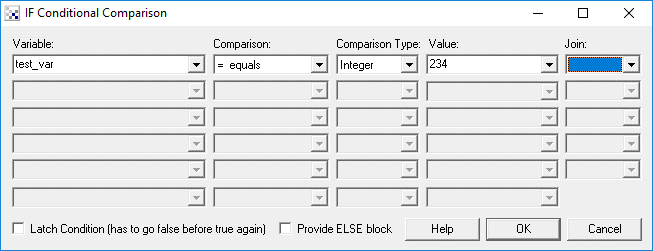
Instructions
1. Variable - Specify the variable to test using the dropdown menus. Select [new] to create a new variable that is not already in the list.
2. Comparison - Select the appropriate comparison.
3. Type - Select the comparison type. The comparison type helps specify how the comparison is performed. For example, if two strings "100" and "2" are compared as text "2" will be greater than "100", but if compared as integers then "100" will be greater than "2".
4. Value - Specify the value to compare to. For variables use the dropdown list. For other static values such as numbers or strings simply type in the value. You can also use the expressions in the value field to test variables based on mathematical expressions of other variables/numbers.
5. Join - Specify the type of join to perform on multiple conditions
6. Latch - Select the Latch Condition if you only want the If Statement to trigger when the condition transitions from false to true, i.e. once true, the condition will not trigger until the condition evaluates to false and then true again.
See Also
Set Variable
| New Post |
| If_Statement Related Forum Posts | Last post | Posts | Views |
 Write Images Module and Timer Module
Hi there, I am trying to figure out a way to capture images from a video camera feed for every 5 seconds. The Write Images modul... |
7 year | 2 | 3987 |
|
soccer robot
hi Steve i'm developing Soccer Robot with RoboRealm . I can detect the ball now but i want to detect another object a... |
8 year | 2 | 3043 |
|
If statement
I am developing a defect detection system and I would like to trigger the detection once an edge of a board has been detected. I... |
9 year | 2 | 3180 |
 Vb script to determine ball in region
I need help to determine ball position in 4 quadrant, which is quadrant 1 to quadrant 4 by using the line as i attach... |
10 year | 2 | 3540 |
|
Speak within an if Statement
Hi, I seem to have a problem with an If statement. When I place Speak within the If statement , no speech is heard... |
10 year | 2 | 3477 |
|
Constant Variable
I'm new to RoboRealm and I'm trying to make a program to detect certain objects. I have filters that filter out everything but t... |
10 year | 2 | 3310 |
|
Bug in multiline cut and if statement
If you try to cut a complete if statement till its end with a multiline cut, things get messed up pretty bad.... |
12 year | 2 | 3681 |
|
Bug with double if creation
Ich you create two if statement directly in sequence, mark the second one and move it upwards, in walks into the first if. OK. T... |
12 year | 2 | 3542 |
|
Testing an integer array for emptyness
Hi, I need to test in a robo file if there exists a Harris_Corner, how can I achieve it? Does "if H... |
12 year | 2 | 3807 |
|
RGB Filter
Is there a way to turn one RGB filter on and turn another off?... |
13 year | 4 | 5264 |
|
Move if-statements more easily.
I've found it very difficult to move if and endif statements around. If you accidentally move an endif statement above its if s... |
13 year | 2 | 3675 |
|
To insert a module in the Pipeline
Hi to the users of this forum, I have a question to do, and I hope that someone has a solution. 13 year |
5 |
4677 |
|
|
Audio
Hi. I have a problem with the audio. For example, when I include a format. Wav or beep in a state i... |
13 year | 4 | 4337 |
|
Display data from Pic
Is it possible to display the data from the Pic. I can see the PIC data I have got it to send in t... |
14 year | 6 | 4329 |
|
compairing variables
How would i compair the the COLOR_SAMPLE_NEAREST Variable from the sample color function to a preset variable in an if command?... |
14 year | 4 | 3842 |
|
Timer and If Statement Module
For some reason I cannot for the life of me get the If Statement Module to work with a "timer" value. All I'm tryi... |
14 year | 2 | 3746 |
|
about using many modules
looking at using a few modules and making robo files how do i use like follow red object,then irobot ro... |
15 year | 4 | 4370 |
|
Else block disabled
Hi everyody, I'm using an If statement in my .robo, and I need an Else block with it. But no matte... |
16 year | 2 | 4401 |