

VBScript
Please be sure to read the Plugins page to get a general sense of if the VBScript module is a good fit for your project.
The VBScript module provides a way to create custom Visual Basic scripts that can be used to process image statistics and map then toward servo/motor values. This module is intented to be used as a way to quickly perform custom operations without needing to implement a Plugin or use the API which typically require external tools.
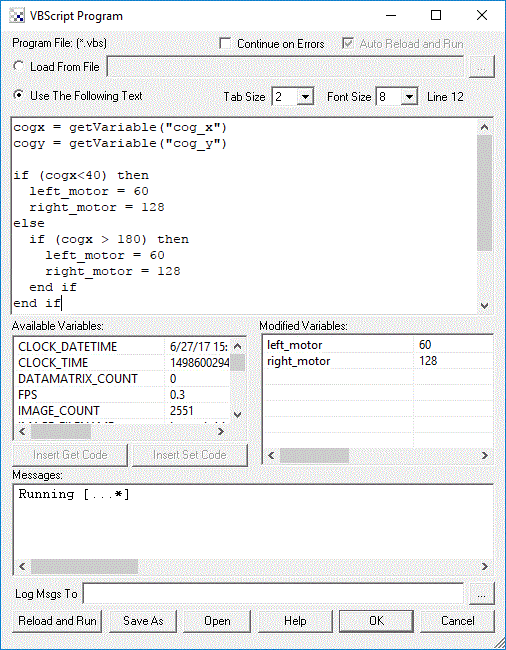
The interface allows two methods for specifying your code. One technique requires that you specify a text file as the source of the program. You can use your favorite text editor to edit/create this file. The file should be a regular text file containing VBScript commands/functions/operators. The program interface displays the current file being used, available system or user variables (and their values) and any messages the program produces.
The alternate way is to include the VBScript text within the provided text box (see below). Using this technique allows you to include the VBScript code within the .robo program and not require another user to save the code and reference a text file as needed by the above file based technique. Using the text box provides a quick way to enter in text but is NOT meant as a replacement for a full featured text editor as its editing features are very basic.
Interface
RoboRealm Specific Functions
- VariableExists("variable_name") - returns true or false depending on if the specified variable exists in RoboRealm. Several of the variable return functions below will return a valid value regardless of if the variable exists or not. You can use this function to determine if the value returned from one of these functions is a valid value.
- GetVariable("variable_name") - returns an integer value of the specified variable. Zero is returned when the variable does not exist.
- GetFloatVariable("variable_name") - returns the float value of the specified variable. A zero is returned when the variable does not exist.
- GetStrVariable("variable_name") - returns the string value of the specified variable. An empty string "" is returned when the variable does not exist.
- GetArrayVariable("array_variable_name") - returns the array associated with the specified variable. An array is ALWAYS returned but the length (ubound) will be zero if the array does not exist.
- SetArrayVariable "array_variable_name", array_variable - sets an array associated with the specified variable name; for example
ReDim points(4)

points(0) = 100
points(1) = 100
points(2) = 150
points(3) = 200

SetArrayVariable "waypoints", points
- SetVariable "variable_name", variable_value - sets the variable value to the specified variable
- SetTimedVariable "variable_name", variable_value, timeout - sets the variable value to the specified variable after
the timeout (milliseconds) has passed. This allows you to specify when in time a variable's value should be
changed. Note that each call to SetTimedVarible will reset the timer so be sure to only call it ONCE to
allow the time to lapse and set the specified value.
This function is useful when you need an alternative to the Sleep function.
By setting a variable to a value in the future you can
emulate a Sleep function by allowing something to happen for a period of time, but then switching it off after the time has lapsed. So
instead of using
SetVariable "motor", 100
Sleep(1000)
SetVariable "motor", 0
you could useSetVariable "motor", 100 SetTimedVariable "motor", 0, 1000
- AddTimedVariable "variable_name", variable_value, timeout - similar to SetTimedVariable, this function will instead
add the timing parameter to a queue instead of overwriting the timing information. For example:
SetTimedVariable "motor", 100, 1000
SetTimedVariable "motor", 200, 1500
SetTimedVariable "motor", 300, 2000
will result in the motor variable being set to 300 in 2 seconds (2000 ms). What happens is that the first two calls to SetTimedVariable are OVERWRITTEN by the third. Instead, if you useAddTimedVariable "motor", 100, 1000 AddTimedVariable "motor", 200, 1500 AddTimedVariable "motor", 300, 2000
the motor variable will be set to 100 in 1 second, 200 in 1.5 seconds and finally 300 in 2 seconds. The AddTimedVariable will add each call into a list that is executed in sequence based on the specified time. - Sleep X - suspends processing for X number of milliseconds and returns control to the pipeline to acquire additional images and send values to external devices.
- WaitVariable "variable_name", variable_value - suspends processing until the specified variable equals the specified value. This function returns control to the pipeline to acquire additional images and send values to external devices while it waits for the variable value.
- WaitVariableChange "variable_name" - suspends processing until the specified variable changes its value. This function returns control to the pipeline to acquire additional images and send values to external devices while it waits for the value to change.
- WaitImage - suspends processing and returns control to the pipeline for one pipeline iteration. This allows for the acquisition of additional images and to send values to external devices.
- GetPixels - returns an array of RGB values of the current image
- SetPixels pixel_data_array - sets the current image to the specified pixel RGB data
- SetParameter "module_name", count, "param_name", "param_value" - changes the specified parameter in the specified module to the specified value. This is useful when a GUI dialog does not have a variable selection as part of the dropdown. Avoid using this function unless necessary as it is slow to update the GUI. Count is used to distinquish between multiple uses of the same module (i.e. module_name would be the same for either module).
- GetParameter("module_name", count, "param_name") - returns the specified parameter in the specified module. This is useful when a GUI dialog does not expose a value within a variable. Count is used to distinquish between multiple uses of the same module (i.e. module_name would be the same for either module).
- GetFloatParameter("module_name", count, "param_name") - the float version of the above routine. Count is used to distinquish between multiple uses of the same module (i.e. module_name would be the same for either module).
- GetStrParameter("module_name", count, "param_name") - the string version of the above routine. Count is used to distinquish between multiple uses of the same module (i.e. module_name would be the same for either module).
- Write "text" - sends text to the module message output area in the dialog interface (used for debugging)
- StopProcessing - stops RoboRealm from continuing to process the images with the remaining modules
- CameraOff - switches off the image capturing from the current camera
- CameraOn - switches on the image capturing using the current camera
- PushButton "module_name", count, "button" - automates pushing a button in one of the
RoboRealm GUI windows. For example:
if GetStrVariable("test") <> "pushed" then
  SetVariable "test", "pushed"
  PushButton "Read_AVI", 0, "Start"
end if
will cause the Read_AVI module (assuming one exists in the pipeline) to start playback.PushButton "RoboRealm", 0, "Snap"
will cause RoboRealm to create a snapshot of the current image. - atan2(x,y) - arc tangent function not present in VBScript but useful for trigonometric calculations
- sqrt(x) - square root function not present in VBScript but useful for trigonometric calculations
Examples
To access variables from your VBScript file/script use the following commands:
MyVar = GetVariable("variable_name")
Or to create a new variable use
SetVariable "variable_name", variable_value
Once a new variable is created this variable becomes available to control functions (such as in the SSC module) that can be used to automatically control a servo/motor.
You can also get variable arrays using
MyVar = GetArrayVariable("variable_array_name")
or get individual entries in an array using
MyVar = GetVariable("variable_array_name:2")
which would return the second entry in an array.
To change a variable's value in X milliseconds you can use
SetTimedVariable "variable_name", variable_value, timeout_in_milliseconds
which is very useful for resetting motor values after a period of time.
All regular VB Script commands and operators are available for use in the VBScript file. See Microsoft Scripting for complete documentation on how to use these commands or view the sample files for examples.
For example the following program (assuming you have added the Center Of Gravity module) will map COG to servo motors:
cogy = GetVariable("cog_y")
if cogx < 140 then
left_motor = 60
right_motor = 128
else
if cogx > 180 then
left_motor = 128
right_motor = 60
else
left_motor = 128
right_motor = 128
end if
end if
SetVariable "left_motor", left_motor
SetVariable "right_motor", right_motor
Note that the COGX values range from 0 to 320. COGY ranges from 0 to 160. These values are bounded by the current image size. These values may change if you crop, shrink, etc. the image dimensions.
You could then use a module like the SSC module to map the "left_motor" and "right_motor" variables to actual servos.
You can also process the image pixels directly using VBScript. This is useful for prototyping but not recommended due to performance reasons for actual usage. The VBScript module supports two routines to get and set the image pixels. Following is the example SwapColor module but in VBScript.
pixels = GetPixels()
for i = 0 to (320*240*3)-1 step 3
tmp = pixels(i)
pixels(i) = pixels(i+2)
pixels(i+2) = tmp
next
SetPixels(pixels)
To write variables or debug statements to a log file you can use
Dim fso
set fso = CreateObject("Scripting.FileSystemObject")
set fi = fso.OpenTextFile("c:\temp\test.txt", 8, true)
if err.number = 0 then
fi.writeLine GetVariable("cog_x") & ":" & _
GetVariable("cog_y")
fi.close
end if
set fi = nothing
set fso = nothing
Note that VBScript can access external activeX objects such as the Microsoft XML Http object. The following example shows this technique to issue a custom URL to a remote machine. Be sure to also have a look at the HTTP module for such tasks.
Dim a
Set objHTTP = CreateObject("MSXML2.ServerXMLHTTP")
objHTTP.Open "GET", "http://172.17.42.54/axis-cgi/io/output.cgi?check=1", False
objHTTP.send ("")
a = Split(objHTTP.responseText, "=")
SetVariable("Output1"),a(1)
' Activate Output 1
Set objHTTP = CreateObject("MSXML2.ServerXMLHTTP")
objHTTP.Open "GET", "http://172.17.42.54/axis-cgi/io/output.cgi?action=1:/", False
objHTTP.send ("")
' Deactivate Output 1
Set objHTTP = CreateObject("MSXML2.ServerXMLHTTP")
objHTTP.Open "GET", "http://172.17.42.54/axis-cgi/io/output.cgi?action=1:\", False
objHTTP.send ("")
The module has a built in timeout mechanism to avoid infinite loops from hanging the application. This timeout is set in Options Button-> Other Tab-> Timeouts Pipeline should you need to increase the default 10 seconds.
Variables
On each successful run of the script the SCRIPT_COUNT variable is incremented. Thus you can use this variable to indicate a first run state where variables can be initialized to default values. Note that the Reload and Run button will reset this count to 0. You can also use the IMAGE_COUNT variable to determine first run when the Run button in the main GUI is toggled. The SCRIPT_COUNT is NOT changed when the main GUI Run button is toggled.
Downloads
If RoboRealm complains about missing components you may need to download the Microsoft Script Control.
See Also
JScript Program
CScript Program
Python Program
For more information
VBScript Tutorial
| New Post |
| VBScript_Program Related Forum Posts | Last post | Posts | Views |
|
RR crashes
Hi Steven This VBScript module starts crashing every time, I run it. Please help me to resolve... |
4 year | 0 | 1343 |
 VBscript Crashing
I recently had 32bit Roborealm installed, everything was working fine. I then had to update to 64 bit for compatibility issues w... |
6 year | 1 | 1939 |
 Access of milisecond
Hello there Can anybody tell how can I access millisecond in vb script module of Roborealm? or any technique to me... |
7 year | 6 | 3877 |
|
VB Script Module
We are adding an encoder to our Advantech digital module input. We are trying to have a Variable "E... |
8 year | 3 | 3197 |
 VBScript Program Error
As I start up RoboRealm I get an error saying I don't have ScriptSite_64.dll in my system32 folder, but it's there, and when I u... |
8 year | 2 | 3387 |
|
VBScript floats decimal mark
Hi there, I am using Roborealm on two different systems, both English windows 10, but on one of the... |
9 year | 3 | 3409 |
 VB Script changes variable but not applying?
I was able to create VB Script to change FPS variable but it doesn't seemed to apply.. under "Avaliable variables -> FPS" in ... |
9 year | 3 | 3586 |
 Problems Using GetArrayVariable in VBScript
I can't seem to get GetArrayVariable in a VBScript to work. I suppose there is some Dim or ReDim required, but I'm no... |
10 year | 3 | 3803 |
|
completed save and open a vbScript is not possible
My problem is roborealm has deleted my vbScript. I write a new Script, close the script and after opening 90% was deleted. How c... |
10 year | 2 | 3270 |
|
VBscript error
I just made a robot with Roborealm and Arduino, which tracks a red object. And it's coded in VBScript. Whenever I run it the ser... |
10 year | 2 | 3374 |
|
Counting Pixels With VBScript
I would like to count the number of pixels in a specified region that fall within a specified grayscale range using VBScript. 10 year |
2 |
2677 |
|
|
Random break time in the pipeline
Hi, I would want to make a random break in the pipeline among a minimum and a maximum of time from me established.... |
10 year | 16 | 4245 |
|
Random pause in the Pipeline.
Dear Mr. Steven Gentner, would want to understand because a casual pause doesn't work in the execu... |
10 year | 1 | 2885 |
|
VB Program help
DearSir/Madam, I am a M.Sc student of Cranfield university/UK. We recently purchased commercial ver... |
10 year | 2 | 2771 |
|
OSC from script
Hi fellow roborealists, I am trying to send fiducial data over OSC. I already have the data I need ... |
10 year | 2 | 3896 |
|
Applying Green Fileter
Hello, We are trying to apply a Green Filter. After we change the pixels we don't see that reflected in the image.... |
10 year | 2 | 3779 |
|
Integer value in Windows-32
I have image with two barcodes (Code128) on it. First one has 10 digits. Second one has 4 digits. Barcode module reads them corr... |
10 year | 2 | 3705 |
|
VBS
my following vbs script work fine in windows. Dim objShell Set objShell = WScript.Cre... |
11 year | 3 | 3392 |
|
navigation by computer vision
am writing a simple vbscript for navigation of car by computer vision ie. image processing i want to send serial c... |
11 year | 27 | 7456 |
|
some modules (VBScript) are not executed
When I run RoboRealm it automatically loads predefined program (RoboFile). Then I press RUN. Usually it works just as expected. ... |
11 year | 3 | 3725 |