

Write Images
The Write Images component allows you save the processed image stream to separate jpeg image files. The files can then be used by other display or processing programs.
Interface
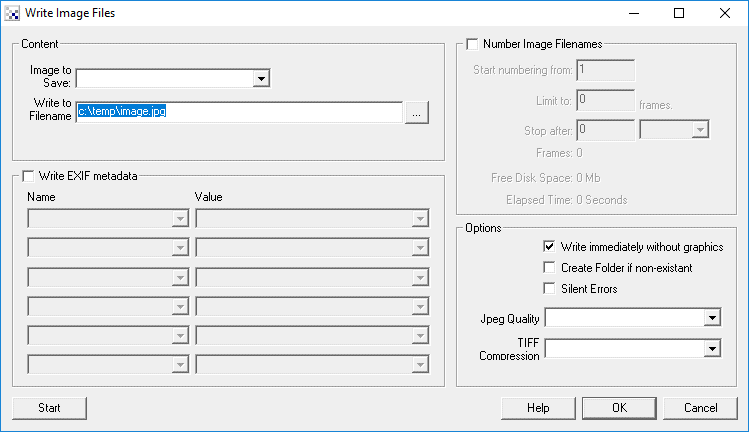
Instructions
1. Image To Save - Specify which image to save.
The Marker labels represent images at the time markers were created. If you wish to process the image at a certain point within the image processing pipeline create a marker at that point. The marker will then be included in the dropdown image list.
2. Write to Filename - Specify the base filename to save the images to. For example if you specify c:\temp\image.jpg then the first image will be called c:\temp\image1.jpg, the second will be c:\temp\image2.jpg, etc. This can also be a variable of the form [my_variable] where my_variable is a variable that contains a fully qualified filename (see Notes below).
2. Options / Create Folder - if the folder doesn't exist it will be created if selected.
3. Options / Silent Errors - to avoid stopping the processing due to an error select the Silent Error checkbox. This will prevent popup errors from happening.
4. Options / Jpeg Quality - if saving Jpeg images specify the quality to use. Default is superb. The lower quality settings will results in more artifacts within the image but result in much better compression (i.e. smaller file size).
5. Options / TIFF Compression - if saving TIFF images specify the type of compression to use within the TIFF file. The default LZW provides the good compression with standard usage, while the Jpeg option provides the best compression but may not work with some image editing/loading applications.
6. Image Numbering - If you want the first image to be c:\temp\image10.jpg then specify the "Start numbering from" to the appropriate value.
Notes
To stop the recording you have two options. You can limit to a set number of frames and/or stop after a set amount of time (whichever comes first).
To start generating frames press ‘Start’. You can also manually stop the recording by pressing ‘Stop’.
Note that any recording will terminate if less than 20 Megs are available on your hard disk to prevent the computer from running out of disk space.
You can also create a custom filename using one of the scripting modules like VBScript. For example using [my_variable] in place of a filename and :
rr.SetVariable "my_filename", "c:\\temp\\my_image" & (rr.GetVariable("image_count") mod 1000 ) & ".jpg"
would cause the images to overwrite each other every 1000 images. This is useful for logging images but
preventing too much diskspace from being used.
Likewise
d = Now()
stamp = Month(d) & "_" & Day(d) & "_" & Hour(d) &"_" & Minute(d)
SetVariable "my_filename", "c:\temp\image_log_" & stamp & ".jpg"
will create a variable my_filename as
c:\temp\image_log_11_8_15_38.jpgwhich is a unique filename for Nov 8th, at 3:38pm. This will change every minute to a different filename. Using a variable as a filename and a bit of programming one can create any filename needed.
See Also
Load Image
Write AVI
| New Post |
| Write_Images Related Forum Posts | Last post | Posts | Views |
 Write Images Module and Timer Module
Hi there, I am trying to figure out a way to capture images from a video camera feed for every 5 seconds. The Write Images modul... |
6 year | 2 | 3965 |
|
RoboRealm doesn't detect free disk space
Hi, I'm trying to save my processed images, but the Write_Images module reports a free space of 0Mb... |
8 year | 3 | 2759 |
|
Write Image Files
Hello STeven, Regarding Write Image Files command, I request following information: | 9 year | 2 | 3096 |
|
only save images when commanded over network?
We have a good pipeline for our FRC robot, but we don't know how it will hold up in competition. On... |
9 year | 3 | 3055 |
|
Load Module
I want to capture image from webcam and write it in a folder and then load the same image onto the RR interface. Images are capt... |
10 year | 2 | 3196 |
|
Reload image
It seems Reload on file change option in Load image module does not work in version 2.80.20. Sergey... |
10 year | 2 | 3779 |
 Write images
Hi STeven Is there a simple way to initialise the saved image number in 'write images'? | 11 year | 2 | 3432 |
|
Write to EXIF
Is it possible to write data from the GPS module to the EXIF file of an image being processed?... |
11 year | 2 | 3659 |
|
Auto start Write Image on starting of RR
Hi, Can the "Write Image" auto start when RR is started without manually pressing Star... |
13 year | 3 | 3725 |
|
Reduce amount of Write Image
Hi Steven, I have attached my Robo file, I would like save every 10th picture written to file. 13 year |
3 |
3701 |
|
|
Write Images
Hello Stevens I made simple program such as ----------------------------------------------------------------------... |
13 year | 2 | 3543 |
|
Write Image
I Have a Kinect looking at a conveyor. When the kinect sees more than one blob I want it to take a picture. | 13 year | 4 | 3715 |
 Object tracking
Just purchased RoboRealm with AVM. I would like to uase RR and AVM to recognize movement and then track the moving object until... |
14 year | 13 | 7699 |
 Tiff compression (Group 4)
How hard would it be to have RR to be able to save out to say a G4 Tiff instead of the IZW format? I know this is a really crapp... |
14 year | 7 | 3974 |
|
Zooming down the viewed image while saving the full image.
Can anyone tell me how I could scale down my displayed image size while saving the full resolution of the image to disk. I am su... |
16 year | 4 | 5209 |
|
How to take snap
Hi Steven I would like to know how to take snap after display the variable in display.... |
17 year | 2 | 4244 |