

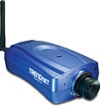
TRENDnet Internet Camera
The TRENDnet Internet Camera module provides access to TRENDnet TV-IP201 Internet cameras such that you can capture the image from the Internet into RoboRealm for further processing.
Interface
Instructions
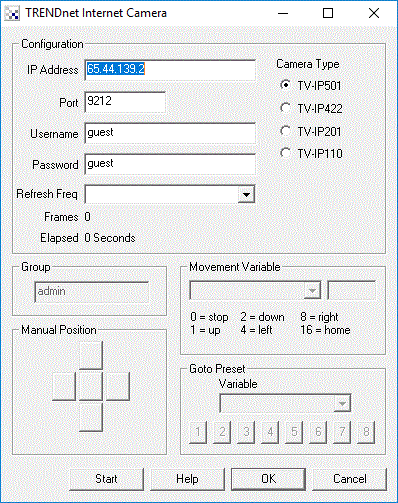
1. IP Address - Enter the IP address of the camera you wish to processes
2. Port - Enter the port number used to access the camera
3. Username - If you have specified authentication for your camera enter the username here
4. Password - If you have specified authentication for your camera enter the password here
5. Refresh Freq. - If you just need a frame every once in a while specify that frequency here. This will allow you to reduce the Internet traffic of the streaming video if you don't need rapid updates. Default is "As Fast As Possible"
6. Camera Type - Select the camera model you are connecting to. Note that the IP422 is the only camera that supports pan/tilt capabilities.
7. Manual Position - use the buttons to move the camera as appropriate. The red center button will move the camera home.
8. Movement Variable - the variable that contains the commands that will move or change the camera attributes. The following values within the variable will create the following movements:
9. Preset - select the variable that contains the preset number to go to or just click on one of the buttons manually to change the camera position. Note that you can use the preset locations to move the camera to known locations quicker than using the movement variable above which preforms a relative incremental move.
10. Start Button - To actually start streaming the video press the START button
For more information
TRENDnet TV-IP201
See Also
HTTP Read
DLink Internet Camera
Linksys Internet Camera
Foscam Internet Camera
| New Post |
| TRENDnet_Internet_Camera Related Forum Posts | Last post | Posts | Views |
 Low Framerate
Hi Guys, I just upgraded from Version 2.26.3 to 2.28.1. I am running the same .robo file on all versions, but my f... |
16 year | 11 | 4622 |
|
TRENDnet TV-IP422W PTZ Camera
Finally got a live video preview via the TRENDnet -110 module, but I have no control over the pan, tilt, and night-vision IR cap... |
16 year | 13 | 7073 |
|
Trendnet TV-IP110W camera and Roborealm woes
I am trying to use roborealm with a Trendnet TV-IP110W Wifi camera. Unfortunately I am unable to access the image fro... |
17 year | 5 | 10960 |