

Linksys Internet Camera
The Linksys Internet Camera module provides an interface to the Linksys camera series. This module is similar to the HTTP Read in that it reads images over the Internet but also provides an easier interface to the Linksys Camera and its pan/tilt capabilities. Note that when accessing cameras over the Internet there can be significant delays when panning or tilting the camera. Keep in mind the delay when using those buttons otherwise you will overreact the movement.
Interface
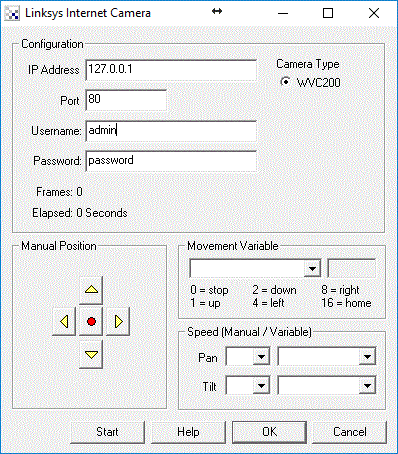
Instructions
1. IP Address - specify the IP address of the camera that you would like to connect to.
2. Port - If you are using a different port number than port 80 simply type that number into the port field.
2. Username - the username for HTTP authentication access.
3. Password - the password for HTTP authentication access.
4. Camera Type - select which camera type you are connecting to. For unlisted Linksys cameras please contact us with a Internet accessible IP address to such camera. Having access will allow us to QA the interface and enable that functionality.
5. Manual Position - use the buttons to move the camera as appropriate. The red center button will move the camera home.
6. Movement Variable - the variable that contains the commands that will move or change the camera attributes. The following values within the variable will create the following movements:
7. Speed - manual or variable setting of pan and tilt speeds. or variable zooming. Either select a manual speed from the dropdown or specify a variable that will contain the required speed. Note that the valid values are from 1 to 10. Values higher or lower will be truncated appropriately. You can use the variables to specify speeds in order to quickly make coarse or fine adjustments to the position of the camera instead of successive sequential small movements.
See Also
HTTP Read
DLink Internet Camera
TRENDnet Internet Camera
Foscam Internet Camera
| New Post |
| Linksys_Internet_Camera Related Forum Posts | Last post | Posts | Views |
| None |