

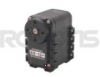
Robotis Dynamixel
The Robotis Dynamixel module provides an interface to the Dynamixel servos made by Robotis. The Dynamixel series robot actuator is a smart, modular actuator that incorporates a gear reducer, a precision DC motor and a control circuitry with networking functionality, all in a single package. The RoboRealm Dynamixel module provides a similar interface to the servo as the RoboPlus application provides but also incorporates RoboRealm variables into the module for automatic control.The module will save all configuration specified to a particular servo and reproduce those changes once activated. This in combination with exposing variables for various servo attributes provides a very accessible control interface to the many capabilities of the Dynamixel servos.
Note that the module expects communication with a CM-700 CPU board set in Monitor mode or the USB2Dynamixel device. No application uploads to the CM-700 board is needed. The module uses the built in Actuator control program.
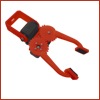
The module provides an easy to use GUI interface to the RoadNarrows Graboid Series D gripper. The Graboid is an ideal solution for those looking for a simple, low-cost gripper with force feedback for their robotic application. Built around 2 Robotis Dynamixel AX-12A Actuators, the gripper offers two degrees of freedom, wrist up/down, and gripper open/close.
Interface
Instructions
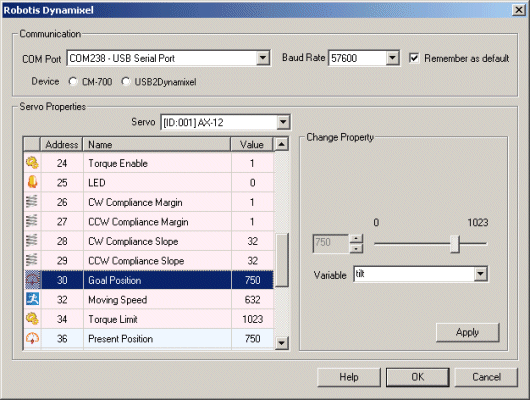
1. Communication - Select the appropriate COM port that the CM-700 or USB2Dynamixel device is connected to.
2. Device - Select which device you have to control the dynamixel servos.
3. Servo - Once the appropriate COM port has been selected you will see all the connected servos listed in the Servo dropdown. Selecting a servo will update the interface to show that servo's information.
4. Servo Properties - You can then select properties of the servo which will produce an interface to the right of the property list that allows you to change the property configuration. Note that once change you MUST press the APPLY button otherwise the change will not be transmitted to the Dynamixel.
The following table (reproduced from Robotis Support Website) outlines the different properties and their meaning with respect to the Dynamixel.
Address |
Name |
Description |
| 0 | Model Number(L) |
Lowest byte of model number |
1 |
Model Number(H) |
Highest byte of model number |
2 |
Version of Firmware |
Information on the version of firmware |
3 |
ID |
ID of Dynamixel |
4 |
Baud Rate |
Baud Rate of Dynamixel |
5 |
Return Delay Time |
Return Delay Time |
6 |
CW Angle Limit(L) |
Lowest byte of clockwise Angle Limit |
7 |
CW Angle Limit(H) |
Highest byte of clockwise Angle Limit |
8 |
CCW Angle Limit(L) |
Lowest byte of counterclockwise Angle Limit |
9 |
CCW Angle Limit(H) |
Highest byte of counterclockwise Angle Limit |
11 |
the Highest Limit Temperature |
Internal Limit Temperature |
12 |
the Lowest Limit Voltage |
Lowest Limit Voltage |
13 |
the Highest Limit Voltage |
Highest Limit Voltage |
14 |
Max Torque(L) |
Lowest byte of Max. Torque |
15 |
Max Torque(H) |
Highest byte of Max. Torque |
16 |
Status Return Level |
Status Return Level |
17 |
Alarm LED |
LED for Alarm |
18 |
Alarm Shutdown |
Shutdown for Alarm |
24 |
Torque Enable |
Torque On/Off |
25 |
LED |
LED On/Off |
26 |
CW Compliance Margin |
CW Compliance margin |
27 |
CCW Compliance Margin |
CCW Compliance margin |
28 |
CW Compliance Slope |
CW Compliance slope |
29 |
CCW Compliance Slope |
CCW Compliance slope |
30 |
Goal Position(L) |
Lowest byte of Goal Position |
31 |
Goal Position(H) |
Highest byte of Goal Position |
32 |
Moving Speed(L) |
Lowest byte of Moving Speed |
33 |
Moving Speed(H) |
Highest byte of Moving Speed |
34 |
Torque Limit(L) |
Lowest byte of Torque Limit |
35 |
Torque Limit(H) |
Highest byte of Torque Limit |
36 |
Present Position(L) |
Lowest byte of Current Position |
37 |
Present Position(H) |
Highest byte of Current Position |
38 |
Present Speed(L) |
Lowest byte of Current Speed |
39 |
Present Speed(H) |
Highest byte of Current Speed |
40 |
Present Load(L) |
Lowest byte of Current Load |
41 |
Present Load(H) |
Highest byte of Current Load |
42 |
Present Voltage |
Current Voltage |
43 |
Present Temperature |
Current Temperature |
44 |
Registered |
Means if Instruction is registered |
46 |
Moving |
Means if there is any movement |
47 |
Lock |
Locking EEPROM |
48 |
Punch(L) |
Lowest byte of Punch |
49 |
Punch(H) |
Highest byte of Punch |
Example
 Click Here to download a robofile that interfaces
with the RoadNarrows Graboid device. It provides a simple button interface to open and close
the gripper, and tilt the wrist of the device. Note that IDs 1 (wrist) and 6 (gripper) are used.
Click Here to download a robofile that interfaces
with the RoadNarrows Graboid device. It provides a simple button interface to open and close
the gripper, and tilt the wrist of the device. Note that IDs 1 (wrist) and 6 (gripper) are used.
For more information
Robotis Dynamixel Ax-12
| New Post |
| Robotis_Dynamixel Related Forum Posts | Last post | Posts | Views |
|
Servo AX dynamixel is not moving
Hi Steven, Currently, I have problem in connecting AX 12 Dynamixel servo. The servo is being recog... |
10 year | 2 | 3643 |
 Combine 2 different pipeline
Hi, I have 2 different pipeline for different detection characteristics which is: 11 year |
18 |
5257 |
|
|
Choppy servo control (dynamixel)
I was able to get my dynamixel servos to be controlled using A USB2Dynamixel adapter but when I set it to respond to COG X or Mo... |
13 year | 2 | 3935 |
 RoboRealm USB2Dynamixel module not communicating
Greetings --- The Dynamixel module doesn't communicate with the servos, a screenshot... |
13 year | 1 | 3993 |
 Robotis cm700 roboplus wireless control
hi im using an rx 64 servo but not for robotic purposes. what i am trying to achieve is to successfully control the servo throug... |
14 year | 3 | 4560 |
|
USB2Dynamixel
I've tried to use Robotis_Dynamixel but no servo was foud. I leaved @1Mbit/s baud rate. can you give any hint? ... |
14 year | 2 | 3904 |
 Pan Tilt arm + Robotis Dynamixel AX-12A
Hi, I bought this arm from crust crawler+ Cm700 controller.. I attach Logitech c525 HD webcam.. 14 year |
28 |
10262 |
|
|
Purchace order
Hi Steven, I have email PO to you last week, but still dont get any reply.. mybe you are quite busy... |
14 year | 7 | 4394 |
|
RR with delta manipulator
I plan to build delta type robot (parallel manipulator) to moving collects objects from moving conveyor. Roboreal... |
14 year | 1 | 4169 |
|
USB2Dynamixel
Hi, I have the USB2Dynamixel and have attached 6 servos to it. Unfortunately RR cannot detect them!... |
15 year | 1 | 4168 |
|
Robotis Dynamixel module not discovering servos
I have the CM-700 and set the module to the correct Baud rate, port and in monitor mode but the module never discovers any servo... |
15 year | 2 | 5629 |