

Media Reader
The Media Reader module allows you to process an image sequence without having a live camera feed. The module play accept AVI, WMV, WMA, MPG files and ASF streams. This is useful for processing the same image sequence over and over in order to test out new modules or experiment with other modules over the same sequence of images.Note that with the addition of the ASF stream you can also hook into image streams broadcasts over the Internet in ASF format. This is similar to the Http Read component but can accept a different streaming format.
If you have issues playing videos due to missing codecs we recommend that you install the K-Lite Codec pack which includes many codecs needed for most videos. You can download the codec from here. And/Or alternatively from FDDShow.
Interface
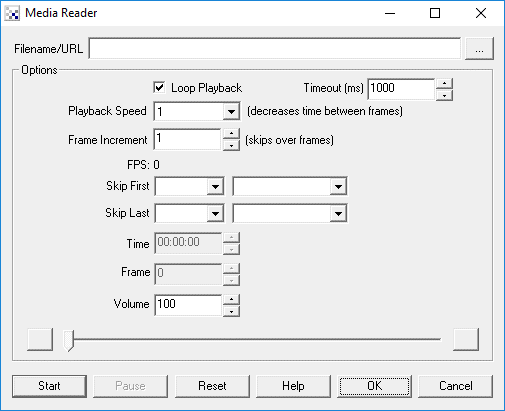
Instructions
1. Filename/Url - Specify the file or url to read in the "Filename/URL" textbox. The media reader can accommodate .avi, .wmv, .mpg, and .asf files.
2. Loop Playback - If you want to loop the playback (only valid for files) then check the "Loop Playback" checkbox.
3. Timeout - On playing videos being streamed over the network a delay is needed in order to allow for network speed fluctuations. If you are playing videos that are stored locally you can reduce the timeout delay which will also be noticed when the video loops. If you are playing files over the network and the timeout is too small the video may accidentally restart as a result of a timeout. Increasing the timeout tells the Media Reader module to wait longer until a new frame arrives over the network before resetting.
4. Playback Speed - To change the playback rate of the video select the appropriate playback speed. Numbers lower than 1 reduce the speed while numbers greater than one increase it. This reduces or increases the time delay between frames.
5. Frame Increment - If you want to skip over the video and only process every other frame set the increment to 2. This will cause every other frame to be skipped.
6. FPS - Displays the current Frames Per Second that the video is recorded in. This number is needed when using the Write_AVI module to ensure consistent timing for reading and writing.
7. Skip - To Skip the first or last part of the video configure the "Skip First" and "Skip Last" accordingly. When the video loops the first X seconds, milliseconds, etc. will be jumped over. Similarly the video will end X seconds before the actual end of the video. Note that this is not cropping or modifying the video in any way.
8. Time - Displays the current frame time of the video. Changing this value will move the video to that time point.
9. Frames - Displays the current frame number of the video. Changing this value will move the video to that time point.
10. Start - You MUST press the "Start" button to begin playing. Once pressed you can also manually stop the playback by pressing "Stop" (the "Start" button will change to "Stop" once playing starts). You can also Pause the video and use the Time, Frames or Slider controls to move the video to a point of interest.
Note that you must press Start for the playback to start streaming. Simply pressing OK will NOT begin playback. Also be aware that for Internet based streams you need to wait about 20-30 seconds after pressing the start button for playback to actually start.
Note that if RoboRealm appears to freeze the connection may be down. Wait for about 20 seconds and you will regain control after the network connection times out.
Variables
VIDEO_FRAME - specifies the frame number of the current video image.
VIDEO_SECONDS - specifies in seconds where the current video frame is within
  the video.
VIDEO_TIME - specifies the HH:MM:SS (hours:minutes:seconds) where the current
  video frame is within the video.
See Also
VLC Player
Read AVI
HTTP Read
| New Post |
| Media_Reader Related Forum Posts | Last post | Posts | Views |
|
Access Media Reader - Start, Stop, Pause, Continue and Reset buttons
I need to start, stop, pause, continue and reset the Media Reader in Kiosk Mode. Could you expose these functions as variables w... |
7 year | 1 | 2049 |
|
Media reader - Pause playback until current frame is processed in RR and API
Hi STeven, I am using the Media Reader for video processing in Roborealm and Python API. The proces... |
8 year | 2 | 3818 |
|
Video
HI, I want to know if it is possible load a video in RR, similarly how we load an image! and i want to process tha... |
11 year | 2 | 3849 |
 Media_Reader missing functionality
Media_Reader cannot read most of my videos. They are usually .avi or .mpg. Sometimes Media_Reader gives an... |
12 year | 9 | 4377 |

 Display Line
Hello! Which are the coordinates that I set to draw the two lines (green and purple) I've drawn in... |
13 year | 6 | 4547 |
|
Media Reader Crashes RR
RR is crashing when the Media Reader module is opened and (1) I click on reset or (2) I click on start with a WMV file selected.... |
14 year | 7 | 4210 |
|
Problem playing MP4
Hi Steven, The following playback test was done on a Windows 7 system ... |
14 year | 2 | 4323 |
|
Help playing Avi
I'm attempting to use footage I have been collecting of traffic, and have RR count the cars. My fi... |
14 year | 5 | 4195 |
|
Supported AVI types?
Which specific AVI type does RR support? I used MediaConvertor 7 (MC7) from ArcSoft to... |
14 year | 4 | 4311 |
|
Video_Frame variable incorrect
I am using Media Reader to read a .mp4 video. I need an accurate variable of what frame the source video is on. 14 year |
2 |
4303 |
|
|
please help to make face/body folower for DV cam rotation head
Dear Roborealmer, I am planing to build an automation platform that can move left and right (single... |
15 year | 7 | 5252 |
|
Media Reader Keep looping!
Hi, I have RR 2.41.0 and media_reader keeps looping the files even when Loop Playback is unchecked.... |
15 year | 1 | 3880 |
|
MP4 media support
STeven, Do you have plans to include mp4 or 3gp video support with the read media module? I would l... |
15 year | 7 | 5049 |