

Listen
The Listen module uses the MicroSoft Speech 5.0 to listen for spoken text. This module is useful for changing states during the execution of the program when no keyboard is available on the robot.Any text heard will appear in the text box and assigned to the variable specified in the interface. We suggest you complete at least one vocal training otherwise the speech recognition will be unusable.
Often the context of speech is important. If you find that you are issuing single word commands without much recognition luck, try to incorporate other words that help localize the context of the word. For example, instead of just saying "yellow" say "the color yellow" and look for the word yellow somewhere in the recognized text. This search can be done using a VBScript module using the InStr function.
Interface
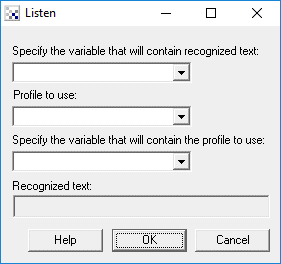
Instructions
1. Specify the variable that will contain the recognized text. You can either select a variable from the dropdown or type in a new variable. Note that any recognized text will appear in the "Recognized text" box.
2. Profile to use - select which voice profile you'd like to use in recognizing text.
3. If you wish to change the profile automatically based on some other event you can
instead specify a variable that will contain the numerical index or the actual name of the
profile as seen in the dropdown list. When this variable changes the profile will automatically
switch to the one specified.
Downloads
The Listen module requires you to download the Microsoft Speech API 5.0 You can find the download at http://www.microsoft.com/speech/download/sdk51/
See Also
Speak
For more information
Microsoft Speech
| New Post |
| Listen Related Forum Posts | Last post | Posts | Views |
 Listen to noise
HI, I am making a home automation robot. I need to set up a noise level detection. I am trying to use "Listen" com... |
11 year | 2 | 3231 |
|
Start Pipeline with speech
I wish to start the RR pipeline when I say "Start" but not sure of the VB syntax to use that stops the pipeline unt... |
13 year | 3 | 3766 |
 Listen Module
I would like to use the Listen module. i have downloaded the speech SDK 5.1 and install it but for some reason the... |
14 year | 4 | 3751 |
|
Listen module with language pack
I know that the listen module uses ms's SDK and that it comes with japanese and chinese lang packs. What I want to know is if i... |
15 year | 3 | 3824 |
|
Voice profiles for listen
Is there any way to get face recognition to select the appropriate voice profile for the listen module? I can get the... |
15 year | 2 | 4342 |
|
How to use speak module?
i've been trying to create a roborealm program basically what i want to do is make the computer listen to the word apple and if... |
16 year | 2 | 4024 |
|
Use voice commands to control roborealm
I am trying to use voice commands to control RoboRealm with the API program. For example, if the user of my project says "Turn... |
16 year | 2 | 4779 |
 Liste Module error
When I click the Listen Module in RR, I get the error "Listen Module failed at CreateRecoContext!". I have no idea... |
16 year | 3 | 4047 |
|
Listen Module error
Ive been having an error with RoboRealm when trying to access the Listen Module. When I click the Listen Module in RR... |
16 year | 0 | 4178 |
|
using the listen module in conjunction with other variables
Steven I am not proficiant at vbs. But I have been able to tweek y... |
17 year | 2 | 4498 |
|
Variables don\'t change for motors?
I'm trying to get my robot to change motor values via voice command. But its not working. The sabe... |
17 year | 2 | 5152 |