

Speak
The Speak module uses the MicroSoft Speech 5.0 download to speak written text. This module is useful for indicating certain states within the execution of the program when no screen is available on the robot.There are two ways to use the speech module. You can either specify a variable that will contain text that will be spoken or you can type in the text directly. Using a variable is useful if you wish to change the spoken text based on a VBScript module or other plugins.
Interface
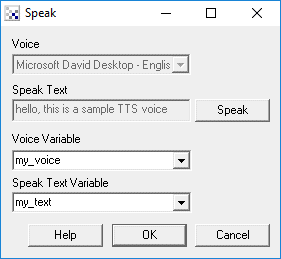
Instructions
1. Voice - select the voice to use when speaking from the dropdown.
2. Speak Text - type in the words that should be spoken in the specified voice.
3. Voice Variable - Specify the variable that holds the voice to use. This can either be a number indicating the appropriate voice as seen in the dropdown list or can be the name, i.e. "Microsoft Sam". Using the voice variable will disable the voice dropdown to indicate that the voice used to speak is now being specified from a variable.
4. Speak Text Variable - Specify the variable that will contain the text to speak. You can either select a variable
from the dropdown or type in a new variable. If this is used the manual textbox is disabled to indicate that
text is now coming from the contents of a variable.
Example Audio
Speak: Robo Realm is a neat program. It makes my computer speak to me!
Note that when specifying text to speak you can play around with punctuation to change the emphasis. For noun words you may try separating the word to improve enunciation. Try it with the text above but merge "Robo realm" into one word. We found it sounds better separated.
Downloads
The Speak module requires you to download the Microsoft Speech API 5.0 You can find the download at Microsoft Speech
See Also
Play Wavefile
Beep
For more information
Microsoft Speech
| New Post |
| Speak Related Forum Posts | Last post | Posts | Views |
|
Speak Module keeps on retaining previous longer string
I wanted the computer to say things like "Target Acquired" or "Tracking", but whenever "Target Acquired" is stated then "... |
13 year | 4 | 3768 |
|
Speak Module repeats itself...
Hello everyone. I've got my robot to obey voice commands, like "come," "reverse," "stop" etc... |
15 year | 9 | 6236 |
|
getting output from RGB filter
Hi,there! If I use the RGB Filter to detect a colour, how I get the signal or an output through the USB port if the RGB filter m... |
16 year | 4 | 4016 |
|
vb script for color filter
what should i edit for the vb script if i want the output to be voice pronunciation?thank you very much for your help.... |
16 year | 2 | 4358 |