

Geometric Statistics
The Geometric Statistics module adds a couple of image statistic variables centered around image geometry. These variables can then be used elsewhere in RoboRealm, for example in the conditional statement, VBScript module or exported to external programs using RoboRealm Plugins.
Interface
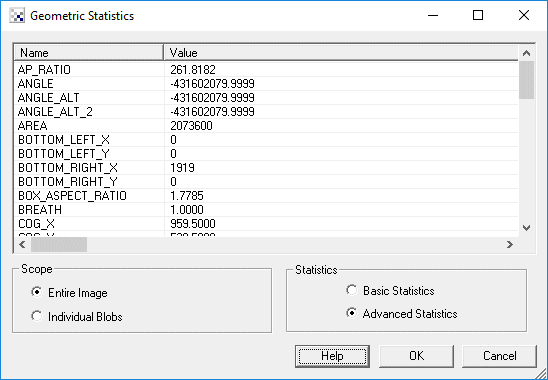
1. Scope - Click on the appropriate radio button to select if you want the statistics to be generated from the entire image or from an individual blob. If you select individual blobs non-black pixels in the current image will be used to form blobs. To see the statistics for an individual blob click on the blob within the main RoboRealm GUI window. That will switch the variable(x) denotation to that particular blob.
2. Statistics - The module can produce many statistical numbers based on the current image. To reduce CPU load for those applications that only require some basic numbers you can select Basic Statistics that will produce a subset of Advanced Statistics that are faster to compute.
Variables
AREA - the number of non-black (0,0,0) pixels in the current image
ANGLE - the orientation angle of the blob. This is calculated by determining the angle from the center of gravity of the blob to the furthest point from that center along the blob's perimiter.
ANGLE_ALT - alternative orientation angle of the blob. This is calculated by determining the vector formed by the center of gravity to the perimiter's center of gravity. If your blob has holes in it this may be a more stable way to determine blob orientation than ANGLE.
ANGLE_ALT_2 - alternative orientation angle of the blob. This is calculated by determining the average vector formed from a current perimiter point to the center of gravity.
COG_X, COG_Y - the center of gravity of the blob
PERIMETER - the number of pixels that surround non black blobs
AP_RATIO - AREA / PERIMETER, determines how round an image is; also known as "Perimeter Equivalent Diameter".
EQUIV_DIAMETER - the diameter of a circle with the same area as the region. Calculated as sqrt(4*Area/pi)
COMPACTNESS - (PERIMETER*PERIMETER) / AREA : ratio of the square of the perimeter to the area; also known as "shape".
COMPACTNESS_2 - sqrt(4*AREA/PI) / FERET : alternate compactness measure
CIRCULARITY - 4*PI*AREA/(PERIMETER*PERIMETER), measure of circularity.
CIRCULARITY_2 - alternate measure of circularity.
CIRCULARITY_3 - MIN_RADIUS/MAX_RADIUS : another alternate measure of circularity.
MAX_RADIUS - radius of enclosing circle around center of gravity
MIN_RADIUS - radius of enclosed circle around center of gravity
FERET - Feret's diameter also known as the caliper length or largest axis length: the greatest distance between any two non-zero pixels
FERET_AREA - FERET * BREATH; also know as Feret's bounding box
FERET_ORIENTATION - orientation of the Feret's diameter in degrees
FERET_FIRST_X
FERET_FIRST_Y
FERET_SECOND_X
FERET_SECOND_Y - points that makeup the Feret diameter
BREATH - the largest axis perpendicular to the Feret diameter
ROUNDNESS - 4*AREA/(Pi*(FERET*FERET)), measure of roundness
MIN_X - minimum bounding box x coordinate
MIN_Y - minimum bounding box y coordinate
MAX_X - maximum bounding box x coordinate
MAX_Y - maximum bounding box y coordinate
EXTENT - proportion of the pixels in the bounding box that are also in the region. Calculated as (blob area / bounding box area).
TOP_LEFT_X
TOP_LEFT_Y
TOP_RIGHT_X
TOP_RIGHT_Y
RIGHT_TOP_X
RIGHT_TOP_Y
RIGHT_BOTTOM_X
RIGHT_BOTTOM_Y
BOTTOM_LEFT_X
BOTTOM_LEFT_Y
BOTTOM_RIGHT_X
BOTTOM_RIGHT_Y
LEFT_TOP_X
LEFT_TOP_Y
LEFT_BOTTOM_X
LEFT_BOTTOM_Y -
the extrema points of the image
FERET_ASPECT_RATIO - FERET/BREATH
BOX_ASPECT_RATIO - (MAX_X-MIN_X)/(MAX_Y-MIN_Y)
WIDTH - the width of the object in pixels
HEIGHT - the height of the object in pixels
Note that you can highlight the appropriate statistics and press CTRL-C to copy the information to your clipboard. This information can then be pasted into Excel or other statistics programs.
See Also
Center of Gravity
Moments of Inertia
Color Statistics
| New Post |
| Geometric_Statistics Related Forum Posts | Last post | Posts | Views |
 Area of Multiple Blobs
Hi there, Thanks for the great program you have created! I really appreciate the effort put into it. I would like ... |
11 year | 6 | 3517 |
|
Multiple Geometric Statistics module
Hi, I am trying to perform two sets of geometric analyses in the same pipeline, but am not sure how... |
12 year | 5 | 3574 |

 Area of region
I'm try to use RR to calculate the area of two round, but not exactly circular, regions in an image. By using edge dection (as ... |
12 year | 5 | 3688 |
|
BREATH variable
Hi STeven, I have noticed that the BREATH variable does not appear in the Watch_Variables module. I... |
12 year | 2 | 3526 |
|
creating a bounding box over a blob group
Hi STeven, Is there a way to place a bounding box over a group of blobs?... |
13 year | 3 | 3493 |
 Multi object tracking and triggering
Here is the working vbscript It work amazingly great for multiblob tracking and triggering. I found very tricky to work with it.... |
13 year | 12 | 6128 |
 Tracking a \"U\" shape of lights
I have a rectangular robot with LED strips around three edges. I'm successfully using RoboRealm to isolate the light from the r... |
15 year | 5 | 4381 |
|
Blob Segmentation and Filtering : Human Targets
Hi, I have been using the movement module to track a single target. It is now my goal to track more than 1 target, starting firs... |
15 year | 11 | 6282 |
 two boxes around two different coloured balls
hi there i would like to have two different boxes around two different coloured balls so i would l... |
15 year | 2 | 4346 |
 Detecting angle of blob
Is this possible, I’m new to roborealm. i want a to detect a blob like see the attachment. When viewing the object... |
16 year | 6 | 6182 |
 Variable Values on VBScript
Hello, I am doing a visual odometry for 3 robots with a camera (determinate the X,Y,theta - positio... |
16 year | 14 | 8100 |
|
COLOUR_STATISTICS averages
I am trying to do fine colour comparisons of items presented to a camera. I am using the COLOUR_STATISTICS after t... |
17 year | 2 | 4430 |
|
Locate brightest pixel
I'm trying to use roborealm to locate the brightest pixel. Does this feature already exist? Thanks!... |
17 year | 2 | 4508 |
 Compass reading
Howdy= Im a beginner and could use a little help. I would like to read the compass heading from a compass. The camera and compas... |
17 year | 4 | 4866 |
 Geometric Statistics Problem
Hi Steven and Prof Mason, Thanks for ur help in my last post about marker p... |
17 year | 3 | 4861 |
 Image Module Problem
Hello Steven, [image1] [image2] I’m trying to align/regi... |
17 year | 9 | 5769 |
 SRV- 1B
Hi. I am using the SRV - 1B for my project and I need to detection of visual markers. The deal with the visual markers is each o... |
17 year | 2 | 4710 |
 triangle direction
hi! how can i find a triangle direction using RR? ... |
17 year | 5 | 5801 |