

Moments of Inertia
Moments of Inertia are statistical values that quantify the rotational inertia of a rigid body (in this case the image intensities). Basically they quantify how much effort would be required to start spinning the image if each image pixel intensity was associated with a certain mass. The higher the pixel intensity the more mass it represents which means the harder it is to induce a rotational movement. (See below for more information).You can use Moments as an effective compact image descriptor that can be used to differentiate it from other images.
Note that Moments are typically used on images that have already been segmented and operate only on image intensity. Color images are converted to grayscale prior to calculating the statistics.
The Moments module calculates moment based statistics and adds them to the RoboRealm variable collection. These variables can then be used in RoboRealm conditional statement, VBScript module or exported to external programs using RoboRealm Plugins.
Interface
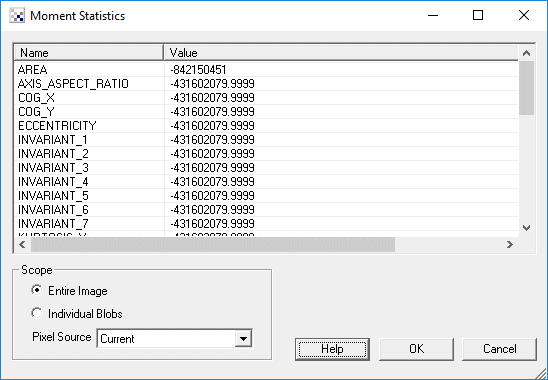
1. Scope - Click on the appropriate radio button to select if you want the statistics to be generated from the entire image or from an individual blob. If you select individual blobs non-black pixels in the current image will be used to form blobs. To see the statistics for an individual blob click on the blob within the main RoboRealm GUI window. That will switch the variable(x) denotation to that particular blob.
2. Pixel Source - If you need to group pixels of different colors into a blobs threshold or otherwise segment the current image BEFORE using this module and then select the "source" image as the image that contains the actual pixel values. This allows the module to segment blobs (of the same thresholded color) but then use the actual pixel values across that blob to determine the statistics.
Without this functionality the module would not be able to segment the current image correctly into individual blobs and end up generating hundreds of individual pixel blobs as a blob is defined as a collection of pixels with the SAME color/intensity.
Variables
ORIENTATION - angle (in degrees) between the x-axis and the major axis of the ellipse
ECCENTRICITY - ratio of the distance between the foci of the ellipse representation of the image and its major axis length
MAJOR_AXIS - if you were to represent the image as an ellipse this would be the length in pixels of the major axis of that ellipse
MINOR_AXIS - if you were to represent the image as an ellipse this would be the length in pixels of the minor axis of that ellipse
AXIS_ASPECT_RATIO - MINOR_AXIS/MAJOR_AXIS - aspect ratio of representational ellipse
KURTOSIS_X
KURTOSIS_Y - a measure of the "peakedness" of the image intensities
SKEWNESS_X
SKEWNESS_Y - a measure of the asymmetry of the image intensities
COG_X
COG_Y - the X,Y coordinate of the center of mass/gravity of the region
VARIANCE_X
VARIANCE_Y
VARIANCE_XY - variance around the mean given the appropriate axis
NORMALIZED_ij - the scale invariant centralized moments (ij means 00 or 01 or 20 etc.)
INVARIANT_ij - the Hu invariant centralized moments (ij means 00 or 01 or 20 etc.)
Note that you can highlight the appropriate statistics and press CTRL-C to copy the information to your clipboard. This information can then be pasted into Excel or other statistics programs.
See Also
Geometric Statistics
Color Statistics
For more information
Wikipedia - Image Moments
Wikipedia - Moment_about_the_mean
Wikipedia - Moment (mathmatics)
Wikipedia - Kurtosis
Wikipedia - Skewness
| New Post |
| Moments Related Forum Posts | Last post | Posts | Views |
| None |