


GPS Reader
The GPS Reader module provides a way to interface RoboRealm to most NMEA GPS devices that can be hooked up to a PC using either a USB or serial connection. GPS devices provide a wealth of information including latitude and longitude that can be used to localize where your robot is, it's heading and where it should go. The GPS Reader module interprets the NMEA text from the GPS device to provide you with a visible interface of the course your robot has taken and allows you to specify waypoints that can be used to create a path. Utilizing the variables produced by this module you can then steer your robot towards its desired path.
Interface
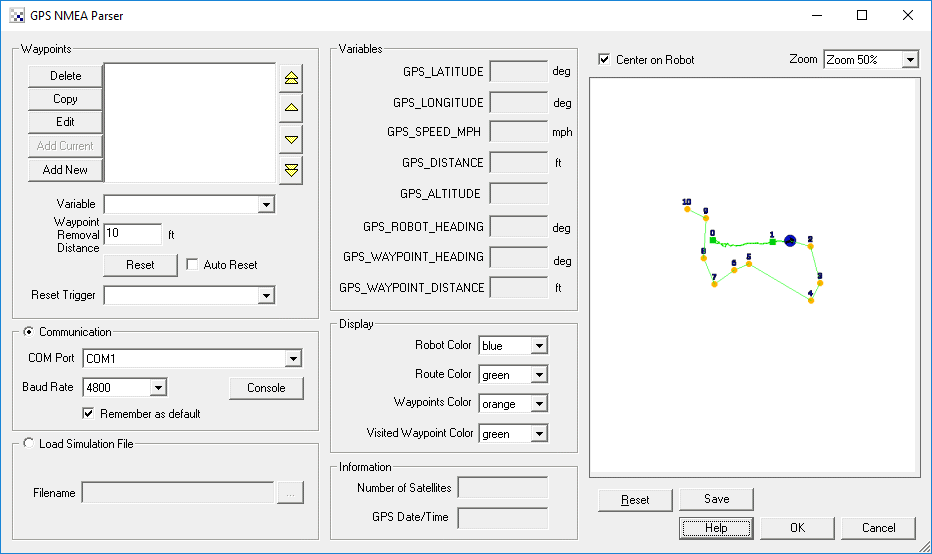
Instructions
1. Communication - select the appropriate COM port that your GPS is connection to. Note that 4800 baud is set as a default communication rate which most GPS devices will use.
2. Load Simulation File - if you do not currently have a GPS device available (or are located indoors) then you can instead specify a file that contains recorded NMEA statements. Once specified this file will be read in and acted on just as if the information was being passed from a GPS device.
3. Map - the white area will display the points specified by the GPS device in black. The current robot location is specified in blue with the waypoints in orange and the planned route in green. If you uncheck the "Center on Robot" checkbox you can move the map around using the mouse to investigate the route. You can also use the zoom dropdown to move towards and away from the map. If you want to clear the map and start from a blank page press the Reset button. If you want to use the map for your own purposes you can use the Marker module to pull in the GPS_MAP image that is produced by this module and kept in memory.
4. Information - The number of satellites and date received by the GPS is displayed in the information section. Use this interface to determine how well your connection is to any satellites. Remember, if you go indoors you will lose all connections.
5. Waypoints - The main purpose of using GPS is to be able to steer the robot along some known path. Using the waypoints interface you can enter in a new Latitude and Longitude coordinate such as 5408.0079 and 01345.6965 and add that as a waypoint. Note that the first 2 and 3 digits are the location degrees with the remainder being seconds. This is the format produced by most NMEA GPS devices. Once this waypoint is added into the list you will see it displayed in the map and additional variables will become active. The two most important variables are the GPS_ROBOT_HEADING which gives you your current heading and GPS_WAYPOINT_HEADING which is the heading you should be on in order to meet with the waypoint. Using these two variables you can decide on how to move the robot to get to the waypoint. Once the waypoint is reached the module will automatically switch to the next.
6. Waypoints Variable - You can also specify a variable that will contain the list of waypoints. Please note that this variable needs to be created from VB or Python using the SetArrayVariable function in order for the waypoints to be accessed correctly. It is assumed that this array includes sets of latitude and longitude numbers (i.e. lat1, lon1, lat2, lon2, etc.) that have been converted to a decimal degree. This is a different format than that used in raw NMEA data (degree minute second) but is what is displayed in the Waypoints list. When you add a new waypoint, you can type in the raw NMEA (degree minute second) coordinates that then get converted into a single decimal degree number.
7. Waypoint Removal Distance - The Waypoint Removal Distance (in feet) defines how close the robot needs to be in order for the waypoint to be considered visited. Because GPS is inherently noisy, this number should be large enough to allow for a certain amount of error. If you notice that your robot is searching and missing waypoints (i.e. it turns around and approaches the same point again) you may have to tight a waypoint removal distance. Likewise, if you notice that the robot does not get near enough to a particular waypoint and seems to bypass it then reduce the removal distance amount.
8. Reset - Resetting the waypoints by pressing the Rest button resets the waypoints that have been visited back to zero and repeats the process. I.e. your robot will now head to waypoint 0 again.
9. Auto Reset - You can chose to loop again and again through waypoints (by selecting the Auto Reset checkbox). This allows for a patroling of waypoints that once complete, should trigger the first waypoint to be visited again.
10. Reset Trigger - Specify a variable that when non-zero will cause the waypoints to reset in that the robot will then target waypoint 0 again. This is functionally the same as pressing the Reset button but instead happens based on a non-zero value of the reset trigger variable. For example, if you have an external application that wants to reset the waypoints and start from the beginning it can send the specified variable to RoboRealm with a non-zero value (say 1) via the API. This variable can change can happen at any time to reset to the first waypoint.
11. Robot Color - the color marker used to identify the robot (circle with an arrow)
12. Route Color - the route between waypoints
13. Waypoints color - the color of the square that identifies the targeted waypoints
14. Visited color - the color of the waypoints that have already been visited
Variables
GPS_LATITUDE - the current GPS latitude value in degrees
GPS_LONGITUDE - the current GPS longitude value in degrees
GPS_DISTANCE - the total distance in meters that the robot has traveled
GPS_ALTITUDE - the current height of the robot (note this
               is typically very inaccurate)
GPS_ROBOT_HEADING - the current orientation of the robot, i.e. direction
                    it is moving
GPS_WAYPOINT_HEADING - the orientation of the waypoint relative to the robot
GPS_WAYPOINT_DISTANCE - the distance in meters till the next waypoint
GPS_WAYPOINT_COMPLETE - signals (becomes 1) when ALL waypoints have been visited
GPS_WAYPOINT_CURRENT - the current waypoint being targeted
GPS_WAYPOINT_REACHED - signals (becomes 1) when the current waypoint has been reached.
                       Note, this will remain 1 until you clear the variable as it only
                       gets set when a waypoint is reached and is NOT cleared. This
                       allows you to perform other tasks at a waypoint and continue
                       targetting the next waypoint when you chose to by setting it to
                       zero.
GPS_NUMBER_SATELLITES - the number of satellites currently being used by
                       the GPS device
GPS_DATE_TIME - the date time stamp as reported by the GPS satellites
If you need a sample GPS NMEA file to run via the simulation you can download this file, save it to a known location and then specify that location in the File Simulation in the GUI dialog. This file is the raw NMEA recorded from a GPS device while walking around the block in Denver, Colorado.
See Also
Path Planning
For more information
Wikipedia - Global Positioning System
GPS - NMEA sentence information
NMEA Data
| New Post |
| GPS_Reader Related Forum Posts | Last post | Posts | Views |
 gps devices
hi steven .. i wanted to know the gps devices which would be highly compatible wid the gps module in RR . | 11 year | 10 | 3998 |
|
Write to EXIF
Is it possible to write data from the GPS module to the EXIF file of an image being processed?... |
11 year | 2 | 3680 |
 Find the coordinates at a given distance and bearing
I need to find the GPS Longitude and latitude of the Target. I have my current GPS position ,have calculated the C... |
12 year | 3 | 4222 |
 object GPS position
Hi I am wanting to display the calculated gps position of a found target on screen. I have a rc pla... |
12 year | 4 | 4201 |
 GPS_Reader module needs more variables
Trip routing is an important robotic and simulation task. It goes down a list of places to go and what to do at each... |
13 year | 8 | 4079 |
|
Waypoint Question and Feature Request
What is the waypoint format for an array of waypoints for the GPS reader. I saw the example on the VBscript page but those point... |
13 year | 2 | 3748 |
|
GPS_Reader waypoint problems
IGPS_Reader is giving me different problems on Win 7 and XP. However, the common problem is with file data and waypoi... |
13 year | 9 | 3919 |
 GPS Module crashing
Hello Everyone, I am using the GPS module for the first time and it seems to crash when I tell it w... |
14 year | 18 | 5681 |