

Joystick
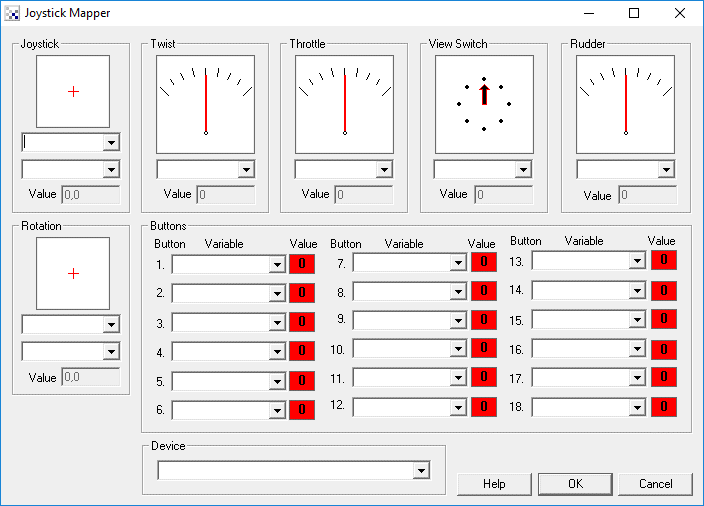
The Joystick module provides you a way to interface a joystick to your robotic projects. This can be useful if you need a manual override or to provide suggestions to your control program. It is also useful for testing out mechanical designs prior to automatic control.
As there are many joysticks with different capabilities this module attempts to capture the basics
of what might be needed. You can edit the interface and try moving your joystick around to see how the
stick, buttons and levers change values in the interface. From that you can map the values into RoboRealm
variables that are used within other modules to perform certain actions.
Interface
Instructions
1. Device - Select your appropriate joystick device from the dropdown list. If your joystick does not appear close this interface, plug in your joystick and double click on the joystick module to reshow the GUI interface. Then select your joystick from the dropdown menu.
2. You should now be able move your joystick and see the guages moving appropriately. By pressing the joystick buttons you should see the red 0 numbers change to a green 1 when pressed.
3. Joystick, Twist, Throttle, etc - Specify the variable that you would like to be set with the corresponding joystick value. You can either type in a new variable name or use an existing one from the dropdown menu.
4. Buttons - specify which variables should be set to 0 or 1 depending on the current status of the appropriate button.
Example
The interface above has been configured to assign the joystick X coordinates to a variable called "joy_x", Y to "joy_y" and the fire button to the variable "fire".
For more information
USB Missile Launcher Tutorial
| New Post |
| Joystick Related Forum Posts | Last post | Posts | Views |
 Arduino Motor Control
Hi, I am working on object tracking, similar to the tutorial Color tracking! But the code written there is for non arduino board... |
11 year | 12 | 4839 |
|
Joystick control of a relay
I am trying to use the 'x' button of a gamepad to change the state of a relay. One press of the 'x' button should... |
13 year | 2 | 3793 |
|
Maping joystick to servos
Hi, Is there a step by step guide to setting up joystick control of the mini maestro servos?... |
15 year | 4 | 6281 |
 Conversion error when acquiring Joystick values using RR_API
As the title conveys, I am trying to transmit joystick values using RR's API. The API is up and running and I am cur... |
15 year | 5 | 4925 |
|
Joystick to Sabertooth
I am using the Joystick module and the Sabertooth module. I need to scale down the Joystick movements from (-1000 to... |
15 year | 3 | 4509 |
|
Distributor
Hello, I am trying to use a Client/Server infrastructure using the Client/Server Distributor. If I am using a Roboard... |
15 year | 4 | 3987 |
|
Button Control of servo
Hello All, fairly new to all this so my apologies if this is extremely obvious.... But how the heck do you control a servo with... |
15 year | 2 | 4587 |
|
Joystick
I'm trying to control my two DC motors through the sabertooth 2X25 and a joystick, but my joystick values are from -1000 to 100... |
15 year | 4 | 4339 |
|
adding center off range to joystick control
I am controlling an ROV with a USB Attack 3 Joystick to a Pololu Maestro controller. I have good control of the slide... |
15 year | 4 | 5189 |
|
Joystick Values
I was wondering if there was any way to set a variable as a joystick value. I know it is possible to read input from... |
15 year | 2 | 4862 |
|
datel retro wireless interface
trying to interface a datel retro wireless joystick with rr but nothing happens when i move the d-pad or press any of the button... |
16 year | 2 | 4617 |
|
gamepad support
I'm using a Logitech Precision game pad for the control for my USB Missile launcher. The problem is that the RoboRea... |
17 year | 5 | 4815 |