

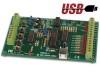
Velleman USB Interface Board
The Velleman K8055 module provides an interface to the Velleman board from RoboRealm. The K8055 interface board has 5 digital input channels and 8 digital output channels. In addition, there are two analogue inputs and two analogue outputs with 8 bit resolution.
Interface
Instructions
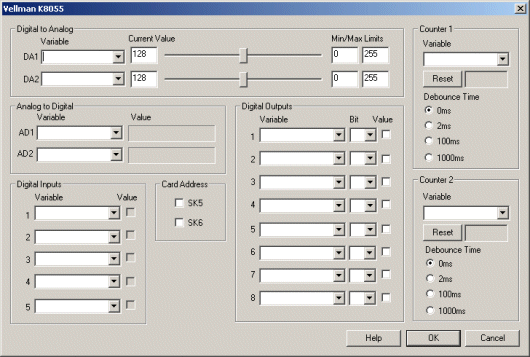
1. Card Address - Select the appropriate Card Address for the Velleman Board.
2. Digital to Analog Output - After specifying the Card Address you can changing the Digital to Analog ports by dragging the sliders to the right or left or by specifying a number within the current value text box in the Current Value textfield. If the ports do not activate check your USB connection and/or board power connections.
Selecting a variable in the provided dropdown will automatically change the servo values based on your VBScript (using the SetVariable function), Extension based program or Set Variable module.
3. Analog to Digital Input - Select an appropriate variable that will contain the value read from the analog port of the Interface board. The value is displayed as a progress bar and indicates the value being written into the specified variable.
4. Digital Inputs - The K8055 comes with 5 digital inputs. The specified variable selected or typed in the combo box will contain the value received from that digital input pin. The value of the pin will be reflected in the checkbox status, checked for 1 and unchecked for 0.
4. Digital Outputs - The K8055 comes with 8 digital outputs. To manually set a digital output click on the provided checkbox. When checked the pin will be set to high, unchecked the pin will be low. To automatically set the pin value select or type in the variable name that contains the appropriate value. You can then select the appropriate bit to check in that value in order to determine the pin status. This bit selection allows you to use a single variable in all digital output pins and use the bit selection to determine which pin should be on. For example, 255 would turn on all pins if each pin uses successive bits (1,2,4,8,16,etc).
4. Counter - Select or type in the variable names that will contain the value of the counter. You can press the reset button to clear the counter and start from zero. Use the radio buttons to adjust the debounce time.
See Also
Phidgets 888 Interface Kit
For more information
Velleman Inc.
| New Post |
| Velleman_K8055 Related Forum Posts | Last post | Posts | Views |
|
Velleman 8055
Hi STeven, yet another obstacle. I just need to flip one bit of I/O. My Velleman K8055 works with my 32 bit versio... |
7 year | 2 | 3343 |
|
Velleman K8055 driver
Hi, I had some problems trying to hook up my K8055 board. Does the module support the 3.0.2 version... |
15 year | 4 | 6338 |
|
Velleman USB
I have a Velleman USB interface board (K8055). I was wondering if there was an easy way to control it from roborealm. I have alr... |
17 year | 17 | 6879 |