

Sort Variables
The Sort Variables module accepts three variables to which to sort by. The Primary, Secondary and Tertiary variables are used to create a sort index that can then be used to sort additional variables in order to keep the relative position the same within different arrays. This module is useful if you need to reorder arrays produced from modules like the Geometric Statistics, Color Statistics, etc.Using this module you can sort based on any single blob array within RoboRealm. For example, you can sort arrays based on an attribute that will create the same ordering based on the color. The interface below shows sorting based on the average color of the blobs. This will always sort in the same order with white (255,255,255) being the last object and blue being the first object. Due to this forced ordering you can now confidently access the first entry of any sorted variable and know that it referrers to the blue object.
Care needs to be taken when choosing the attribute to order on. Color works but only if you have used the Color Filter, RGB Filter, Replace Blob, Sample Color, etc modules to ensure that the colors are replaced with solid. If the colors of two objects are very close they may sometimes sort in order but may other times sort out of order. There would be no guarantee that the order is always the same.
Note that this module helps to solve the object id order issue. When processing an image there is NO guarantee that an object's index within a statistical array will be the same from one frame to the next. If it appears to be that is largely due to luck. You need to use a feature/characteristic/attribute of the object compared to the others in order to ensure that the ordering is the same. These features can be color, size, location, etc. For more complex tracking of objects see the Blob Tracker.
Interface
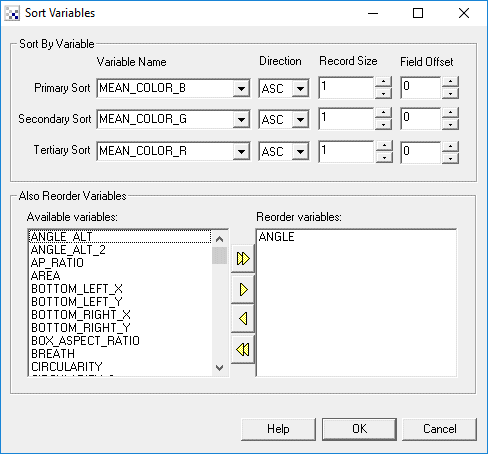
Instructions
1. Primary Sort - Select the variable array to use as the primary ordering.
2. Secondary Sort - Select the variable array to use as the secondary ordering. The secondary ordering is sorted before the primary sorting such that values that are the same in the primary sort will be sorted with respect to the secondary values.
3. Tertiary Sort - Select the variable array to use as the tertiary (third) sorting. Values that are the same for the secondary and primary sorting will then by ordered as specified by the values in the tertiary array.
4. ASC/DESC - Select which direction you want the sort order to be. Use ASC for ascending (increasing) and DESC for descending (decreasing).
5. Also Reorder Variables - Select those variable arrays that you want to also be reordered based on the sorting results of the Primary, Secondary, and Tertiary arrays. These arrays will then keep in sync with those values in the sorted arrays such that an index to a value before the sort will contain the same correlated values in all other arrays.
See Also
Blob Tracking
Filter Variables
Chart Variables
| New Post |
| Sort_Variables Related Forum Posts | Last post | Posts | Views |

 document processing
I have a document and need to read out the corssed rectangles. How can i do that?... |
12 year | 4 | 3618 |