

Point Location
The Point Location module provides a quick way to identify specific coordinates within the image based on their location. For example, you may want to know the position of the highest point of any non-black pixel within the image to identify a maximum peak. Note that this module operates on a binary image.The module is often used after numerous morphological operations that have thresholded the image and changed the image shape.
Note that the north, south, east, and west points are calculated relative to the object's Center of Gravity point.
Interface
Instructions
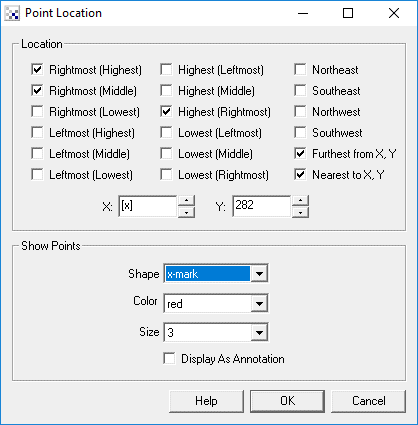
1. Location - Select each point that you would like to indicate with the image. Note that for each point a variable with a similar name is created with the X and Y coordinates of the point.
2. X,Y - Once Nearest X,Y and/or Furthest X,Y is selected the X and Y coordinate text boxes will be enabled. You can specify the X and Y coordinates of the point that should be used when comparing for furthest and nearest object points to the specified point. Keep in mind that the [expression] notation also applies in the text boxes.
3. Shape - The shape of the marker that indicates where a point has been sampled.
4. Color - The color of the marker that indicates where a point has been sampled.
5. Size - The size of the marker.
Example
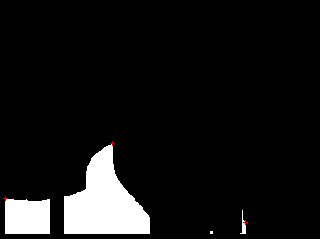
| Leftmost, Rightmost and highest points indicated in red X |
 |
Variables
HIGHEST_LEFTMOST_X
HIGHEST_LEFTMOST_Y

HIGHEST_MIDDLE_X
HIGHEST_MIDDLE_Y

HIGHEST_RIGHTMOST_X
HIGHEST_RIGHTMOST_Y

LEFTMOST_HIGHEST_X
LEFTMOST_HIGHEST_Y

LEFTMOST_MIDDLE_X
LEFTMOST_MIDDLE_Y

LEFTMOST_LOWEST_X
LEFTMOST_LOWEST_Y

LOWEST_LEFTMOST_X
LOWEST_LEFTMOST_Y

LOWEST_MIDDLE_X
LOWEST_MIDDLE_Y

LOWEST_RIGHTMOST_X
LOWEST_RIGHTMOST_Y

RIGHTMOST_HIGHEST_X
RIGHTMOST_HIGHEST_Y

RIGHTMOST_MIDDLE_X
RIGHTMOST_MIDDLE_Y

RIGHTMOST_LOWEST_X
RIGHTMOST_LOWEST_Y

NORTHEAST_X
NORTHEAST_Y

NORTHWEST_X
NORTHWEST_Y

SOUTHEAST_X
SOUTHEAST_Y

SOUTHWEST_X
SOUTHWEST_Y

FURTHEST_X
FURTHEST_Y

NEAREST_X
NEAREST_Y
See Also
Sample Line
Sample Curve
Ultimate Points
| New Post |
| Point_Location Related Forum Posts | Last post | Posts | Views |

 FRC 2015 - Yellow Tote Angle Measurements
Hi, Using the Visual Targeting tutorial found on ... |
11 year | 2 | 4197 |
 measuring x,y,z distance
I have a 6-axis anthropomorphic robot performing some very detailed & intricate wood-carving. There is some error in ... |
12 year | 3 | 3946 |
 Blob point extraction
Hi STeven, I attached an image here. I want to extract the point X=347 Y=13. If i extract the blobs... |
14 year | 5 | 4286 |
 Defect detecting in weldings
Steven, I have been testing the software, and it looks that covers my needs. | 16 year | 6 | 4947 |