

Logitech Orbit/Sphere, MP, AF
The Logitech Orbit module provides control over the Logitech Orbit Webcam's motorized pan/tilt capabilities. Similar to servo control systems the Orbit provides left and right 189 degree panning and 102 degree tilt. Using the Logitech Orbit module you can control the Orbit camera based on what it sees.
Interface
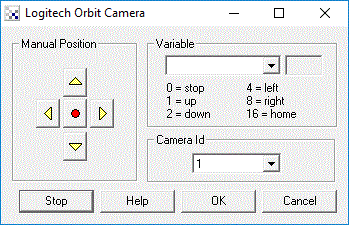
Instructions
1. Manual Position - If you have the Orbit Camera installed you should be able to use the buttons within the Logitech Orbit dialog to manually move the camera in the direction of the pressed button.
2. Variable - To automate the movements based on programmatic control select which variable holds the
appropriate bitwise command. This command variable should contain the following values
as appropriate:
3. Camera Id - If you have more than one Logitech camera running on your system you can change the camera id which will cause the control to switch to the next Logitech camera. This also works across the different versions of the Orbit/Sphere/etc. product line.
4. Stop - To stop executing the value within the variable for a period of time press the STOP button.
This will terminate camera movement until the same button (now called START) is pressed again
or the program is restarted.
Example
 Click here
to load a configuration to move the Orbit camera using your cursor keys.
Click here
to load a configuration to move the Orbit camera using your cursor keys.
Click here
to load a configuration that will cause the Orbit camera to track the color red.
See Also
Creative Live Motion
DLink Internet Camera
Dream Cheeky Missile Launcher
| New Post |
| Logitech_Orbit Related Forum Posts | Last post | Posts | Views |
|
Webcam Control Tutorial files don\'t work for Presets or Auto Pan
I have downloaded the move_orbit.robo file, have it running, and I'm using the default web server and the Logitech Orbit camera... |
16 year | 6 | 4658 |
|
Webcsm with Zoom Facility
Hi, Anyone suggest me the webcam with zoom facility.I need to control the zoom through software.I n... |
16 year | 10 | 6733 |
|
Thermal camera
Hi! Im using a very low cost webcam: SN9C201, USB 2.0 and I pl... |
16 year | 6 | 6992 |