

Laser Spot
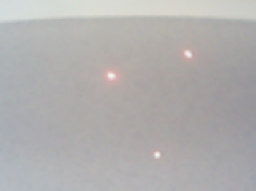
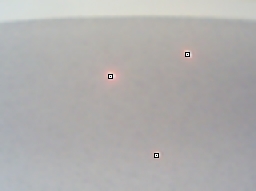
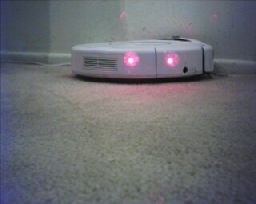
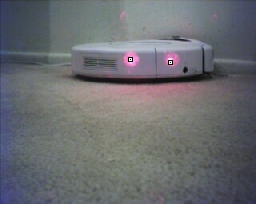
The Laser Spot module provides an easy way to identify a red laser spot within the current image. The detection routine looks for characteristics that indicate the presence of a red spot that include intensity, color and shape. The module will graphically indicate the location of the laser dots and also create a LASER_POINTS variable array that holds the X,Y locations of the detected spots.This module can be used with handheld lasers such as those sold by OrbTronic.
Interface
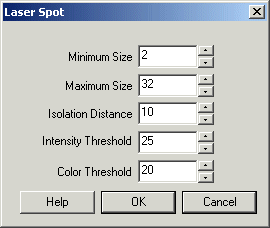
Instructions
1. Minimum Size - Specify the smallest laser dot that you would like to detect. If you notice that your image has many incorrectly detected laser dots try increasing the minimum size which will make the detection much less sensitive to noise. Often noisy pixels can be detected as very small laser spots.
2. Maximum Size - Similar to minimum size the maximum size of the laser spot can be set.
3. Isolation Distance - Specify how close each laser dot can be to other laser dots. Because laser points include noise the detector may decide that one laser dot is in fact more than one. Using the isolation distance you can prevent laser dots from "clumping" together due to noisy detection.
4. Intensity threshold - Laser dots are typically higher in intensity than most (but not all) other parts of the image. Use the intensity threshold if you are unable to detect the laser dot (due to a weak laser) and need to decrease the recognized intensity. Likewise, if too many dots are identified try increasing the value to eliminate bad matches.
5. Color threshold - This module detects red laser dots only. Reduce this threshold if your red dot is not getting recognized. Increase it if too many dots are being identified.
6. Display as Annotation - Select if you want the graphic to be draw after all processing has been completed. If this is NOT selected then the next module in the processing pipeline will see the graphic as if it were part of the image and process it accordingly.
7. Shape, Color, Size - Specify the shape, color and size of the graphic that is used to indicate the point location. Note the default is the outline shape which has a set size and color.
Example
| Source | Laser Spots |
 |  |
 |  |
 |  |
Variables
LASER_POINTS - an X,Y array (even numbered array) that contains the X,Y locations of each identified laser dot.
See Also
Laser Line
| New Post |
| Laser_Spot Related Forum Posts | Last post | Posts | Views |
|
Receiving data from LEDs
Just trying out RR, and I have a newbie question. With swarm robots, people often blink LEDs on top of the robots to send data t... |
10 year | 2 | 2995 |
|
Distance and Angle Measurements
We are trying to figure out the best way to measure the distance from the camera to the object being inspected, as well as the p... |
10 year | 2 | 3608 |
|
Sending data from roborealm to arduino?
So I setup my iphone to act as a webcam (which actually works fairly well surprisingly). I setup RR to track the colo... |
12 year | 2 | 3405 |
|
LED Testing
Hi, I am looking to use Roborealm as part of a board production test that contains 42 LEDs spread across the PCB. Each LED can l... |
12 year | 3 | 3616 |

 tracking IR-LEDs
Hello, For a work in progress with a dancer I do color tracking to create sound with SuperCollider sending OSC mes... |
12 year | 2 | 3541 |
|
Obstacle Avoidance Laser System
Dear all, I have a project whch will permit to detect and avoid obstacle, using three lasers beams,... |
13 year | 2 | 4034 |
|
Processing a subset of a picture
So I have figured out how to spot a laser point, but I need to caculate the center of a pixel down to the subpixel range. &... |
16 year | 4 | 4580 |
|
What is the LASER_ORIENTATION variable in Laser_Spot module?
I can't find any description for the LASER_ORIENTATION variable in the Laser_Spot module. I don't understand what it could be... |
16 year | 3 | 4383 |
|
Unseening camera
I have been testing several cameras to test sensitivity to several wave lengths of lasers. So I have had to switch my... |
16 year | 5 | 4575 |
 Laser spot processing
Hi Baghdad_boy, I'm sending two snapshots which was taken with no filter, camera settings: brightn... |
16 year | 8 | 6515 |
|
Webcam Rangefinder
Is it possible to implement a distance meter (rangefinder) using a webcam and the laser spot module? If so, can you please give... |
16 year | 2 | 5945 |
|
Laser tracking
Hello, Is it possible to track a laser with a robot that is controlled by a Sabertooth dx10 motorco... |
17 year | 6 | 5100 |