

FFT - Fast Fourier Transform
The FFT module provides a way to transform the current image from spatial (x,y intensity) space into frequency space. The FFT is one of the cornerstone routines use in signal processing as it can be used to eliminated repetitive signals from the source data. The FFT module will decompose an image into its fundamental intensity frequencies that can be filtered and recombined to create a new image.The results of a Fourier Transform are two data channels. The first channel that contains the intensity or real numbers is often referred to as the power spectrum. This is the channel that can be processed to remove certain unwanted artifacts from an image. The second channel is called the phase channel. This channel contains the imaginary or phase information resulting from the Fourier transform and is only needed if a reverse transform is desired. Typically this channel is not processed and simply passed through unchanged to the inverse transform.
The main use of the FFT in image processing is for the removal of repetitive noise from an image. This is accomplished by transforming the image into the frequency space using the FFT module and then masking out the points within the power spectrum that reflect the presence of a particular signal. Once transformed into the frequency space it is easy to see points or lines in the power spectrum that are created due to sinusoidal noise in the original image.
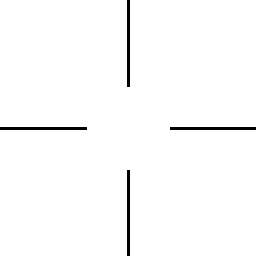
Combined with the arithmetic module you can create an image mask (using an external image paint program) that can be used to eliminate certain hotspots or lines from the power spectrum and then perform an inverse FFT to regain the original image.
Note that the FFT module produces the power and phase in different channels. After the FFT module has run the RED channel will contain the power spectrum whilst the green channel contains the phase (or imaginary) information. Both channels are required for if an inverse transform is performed. Note that doing a forward transform, followed by an inverse transform will result in the original image. To view the power spectrum you would need to add in the RGB_Channel module and filter just for Red.
Once the power spectrum has been processed you can use the Combine_RGB module to combine color channels back into a single image to view the results.
The FFT module operates in grayscale only and requires a power of 2 image (width and height are 128, 256, 512, etc.) to process the image. You can add back in color information from the original image if desired (see example below) by separating RGB into a HLS color space and replacing the L space with the FFT power spectrum.
Interface
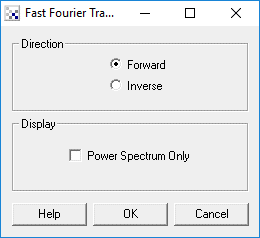
Instructions
1. Select if you want to perform a forward or inverse FFT transform.
2. If you do not need the phase information you can select the "Power Spectrum Only" checkbox will which remove the phase information from the computed image. Note that the phase information is required if an inverse transform is eventually desired.
Example
| Source | Processed FFT |
 |  |
| Power Spectrum with Mask | |
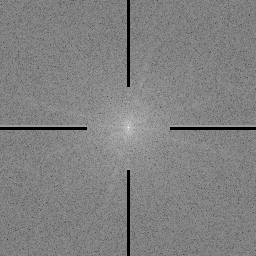 |
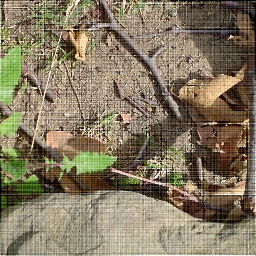
Note that horizontal and vertical striations in the source image above. These frequencies correspond to a horizontal and vertical lines in the power spectrum. Using the above mask removes those frequencies which when inverted to RGB space no longer exist. The full RGB color information is acquired by converting the image to HLS color space and then substituting in the inverse FFT into the 'L' channel. The resulting image is the converted back to RGB color space to produce the final image.
Example
 Click here
to load a configuration that uses the FFT module to eliminate horizontal and
vertical noise signals as seen above. You will also need to download the
mask image as seen below.
Click here
to load a configuration that uses the FFT module to eliminate horizontal and
vertical noise signals as seen above. You will also need to download the
mask image as seen below.
See Also
Math
Combine RGB
Load Image
For more information
4N6site Fourier Transform Plug-in
XBIT - Convolution and FFT
Gilles Carpentier - ImageJ
RetouchPRO Tutorials - FFT
Steven W. Smith - FFT Programs
CSIE - FFT
ImageJ FFT
| New Post |
| FFT Related Forum Posts | Last post | Posts | Views |
 how to detect knurling defects
Hi, I came across this awesome software and I'd like to master it. But there are so many functions that I am a bi... |
10 year | 5 | 4772 |