

Barcode Reader
The Barcode Reader module provides a way to detect and decode barcodes that are visible in the current image. If you would like to use RoboRealm for additional barcode detection please let us know and we will add the particular barcode type to this module. We only add barcode types base on customer request. Please contact us to request additional barcode types.
Interface
Instructions
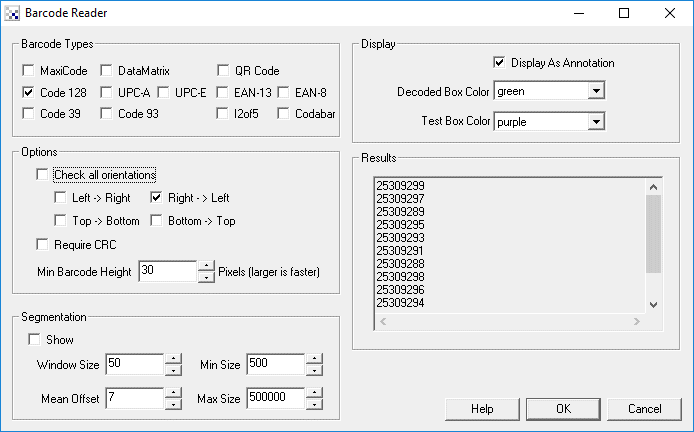
1. Decode Box Color - select the color of successfully detected and decoded barcodes.
2. Test Box Color - select the color of barcodes there were detected but could not be decoded.
3. Barcode Types - (2D) MaxiCode, (1D) Code 128, UPC-A, UPC-E, EAN-13, EAN-8, Code 39, i2of5, Codabar, DataMatrix, QRCode
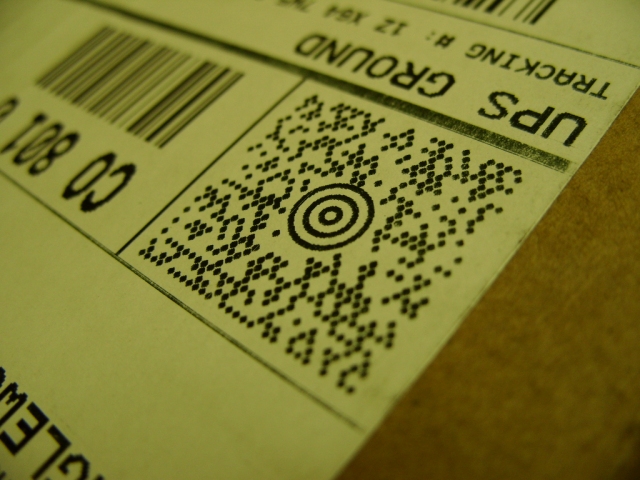
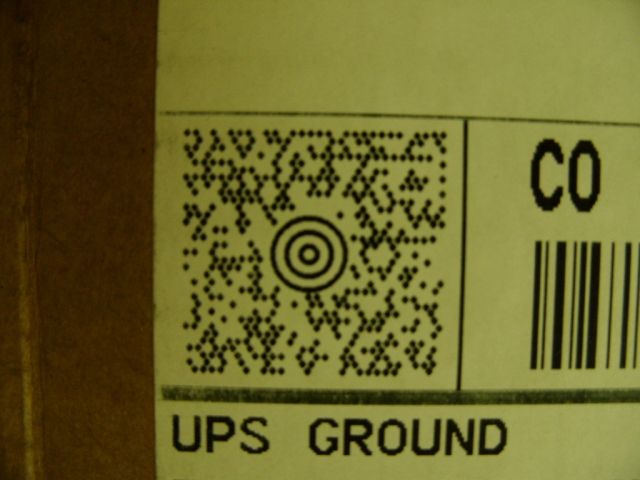
MaxiCode is a fixed-size (1.11inch x 1.054 inch nominal) two-dimensional symbology made up offset rows of hexagonal elements around a unique circular finder pattern. A MaxiCode symbol has 884 hexagonal modules arranged in 33 rows with each row containing up to 30 modules. The maximum data capacity for MaxiCode is 93 characters. MaxiCode is used by United Parcel Service (UPS) for package tracking.
While any data can be contained in a MaxiCode the typical UPS MaxiCode contains a Postal code, Country Code and Service mode in addition to a string of text that contains additional information such as street address. Because the MaxiCode has two error correcting modes it is possible to detect the Postal, Country and Service codes without being able to detect the rest of the street address. RoboRealm indicates this situation using the MAXICODE_MESSAGE_RAW variable which provides the rest of the textual information that could not be correctly decoded.
Note that due to the complexity and detail required for a MaxiCode you will need to place the webcam close to the MaxiCode in order to successfully read the code. We recommend a minimum resolution of 640x480 in order to ensure that enough detail is represented in order to decode.
The 1D barcodes are traditionally seen on products that one would typically buy at a store. Most of them include a CRC digit which helps to reduce accidental recognition. Code 39 does NOT have a CRC check and therefore can cause many false matches. In this case you may need to create additional filters prior to the barcode module to isolate just the barcode.
4. Check all Orientations - Some 1D barcodes can be checked to exist in multiple orientations. Selecting this checkbox will check multiple directions for the presence of barcodes. Note, this slows processing speed. This only applies to 1D barcodes. The 2D barcodes (DataMatrix, QRCode, MaxiCode) are detected in any orientation regardless of this setting.
5. Left->Right, Right->Left, Top->Bottom, Bottom->Top - Specifies that the orientation be checked in the specified order. This allows specific angles to be checked 0, 180, 270, 90 degrees rather than all orientations. This ensures faster processing speed.
6. Require CRC - Some 1D barcodes have optional CRC checking. This can help to ensure correct decoding of barcodes but will remove partial decoding of some barcodes.
7. Min Barcode Height - Specifies the minimum height of a barcode that would be detected. Specifying as large a number as possible allows the module to skip over the image quicker than with smaller numbers.
8. Show Segmentation - Embedded within the module is an adaptive threshold method to isolate 2D barcodes like DataMatrix. Selecting this checkbox will show you what the current segmentation parameters are working with.
9. Window Size/Mean Offset - Parameters exposed from the Adaptive Threshold technique
10. Min/Max Size - Specifies the size of the bounding box of the code that will be considered. Those objects with size less than min and greater than max will be excluded from the decoding process. This filter can be used to speed up the decoding process by eliminating objects early in the analysis process.
11. Display As Annotation - Select if you want the graphic boxes to be draw after all processing has been completed. If this is NOT selected then the next module in the processing pipeline will see the graphic as if it were part of the image and process it accordingly.
12. Decoded Box Color - The color that is used to indicate a correctly decoded barcode.
11. Test Box Color - The color to use to indicate a possible barcode shape but with an incorrect decoding (i.e. the CRC or other failed).
13. Results - The detected codes. Note, these are also created as RoboRealm variables (see Watch Variables module) that can be used in other modules.
Test MaxiCodes (right click and select "Copy image" to copy these images and paste use CTRL-V to paste into RR)
 |  |
Variables
BARCODE - the fist decoded 1D barcode information
BARCODE_COUNT - the number of detected 1D barcodes
BARCODE_X - the X decoded 1D barcode information

BARCODE_X_COORD_N - the x coordinate of the center of the Nth barcode
BARCODE_Y_COORD_N - the y coordinate of the center of the Nth barcode

BARCODE_X1_COORD_N - the upper left X coordinate of the Nth detected barcode
BARCODE_Y1_COORD_N - the upper left Y coordinate of the Nth detected barcode
BARCODE_X2_COORD_N - the upper right X coordinate of the Nth detected barcode
BARCODE_Y2_COORD_N - the upper right Y coordinate of the Nth detected barcode
BARCODE_X3_COORD_N - the lower right X coordinate of the Nth detected barcode
BARCODE_Y3_COORD_N - the lower right Y coordinate of the Nth detected barcode
BARCODE_X4_COORD_N - the lower left X coordinate of the Nth detected barcode
BARCODE_Y4_COORD_N - the lower left Y coordinate of the Nth detected barcode

MAXICODE_POSTAL_CODE - the zip code destination for the package
MAXICODE_COUNTRY_CODE - the country code (840 for the USA)
MAXICODE_COUNTRY_NAME - the country code expanding into a readable name.
MAXICODE_SERVICE_CLASS - the package service class
MAXICODE_MESSAGE - other information include street address
MAXICODE_MESSAGE_RAW - contains the raw message if it could
  not be decoded correctly

DATAMATRIX_COUNT - Number of recognized datamatrix codes
DATAMATRIX_MESSAGE - the content of the datamatrix code
DATAMATRIX_ORIENTATION - the detected orientation (degrees) of the code

DATAMATRIX_X_COORD_N - the x coordinate of the center of the Nth datamatrix barcode
DATAMATRIX_Y_COORD_N - the y coordinate of the center of the Nth datamatrix barcode

DATAMATRIX_X1_COORD_N - the upper left X coordinate of the Nth detected barcode
DATAMATRIX_Y1_COORD_N - the upper left Y coordinate of the Nth detected barcode
DATAMATRIX_X2_COORD_N - the upper right X coordinate of the Nth detected barcode
DATAMATRIX_Y2_COORD_N - the upper right Y coordinate of the Nth detected barcode
DATAMATRIX_X3_COORD_N - the lower right X coordinate of the Nth detected barcode
DATAMATRIX_Y3_COORD_N - the lower right Y coordinate of the Nth detected barcode
DATAMATRIX_X4_COORD_N - the lower left X coordinate of the Nth detected barcode
DATAMATRIX_Y4_COORD_N - the lower left Y coordinate of the Nth detected barcode

QRCODE_COUNT - Number of recognized datamatrix codes
QRCODE_MESSAGE - the content of the datamatrix code
QRCODE_ORIENTATION - the detected orientation (degrees) of the code

QRCODE_X_COORD_N - the x coordinate of the center of the Nth QR barcode
QRCODE_Y_COORD_N - the y coordinate of the center of the Nth QR barcode

QRCODE_X1_COORD_N - the upper left X coordinate of the Nth detected barcode
QRCODE_Y1_COORD_N - the upper left Y coordinate of the Nth detected barcode
QRCODE_X2_COORD_N - the upper right X coordinate of the Nth detected barcode
QRCODE_Y2_COORD_N - the upper right Y coordinate of the Nth detected barcode
QRCODE_X3_COORD_N - the lower right X coordinate of the Nth detected barcode
QRCODE_Y3_COORD_N - the lower right Y coordinate of the Nth detected barcode
QRCODE_X4_COORD_N - the lower left X coordinate of the Nth detected barcode
QRCODE_Y4_COORD_N - the lower left Y coordinate of the Nth detected barcode
See Also
Fiducial
For more information
Wikipedia - DataMatrix
Wikipedia - QRCode
Wikipedia MaxiCode
Morovia MaxiCode Symbology
Wikipedia - Code 128
| New Post |
| Barcode Related Forum Posts | Last post | Posts | Views |

 QR Code read
I can't seem to be able to read QR Codes using roborealm, I'm adding a picture and "Barcode Reader" I enable QR Code and DataMat... |
6 year | 4 | 3871 |
|
Location of barcodes in image
We would like to use RoboRealm to read all barcodes in a stack of cartons as part of a factory automation system. We ... |
8 year | 5 | 2788 |
 barcode decoding
This image has a code 128 barcode. However, I need to select all the following module check boxes before the result code show up... |
8 year | 1 | 3224 |
|
OCR, 1D and 2D codes
can you read all these codes? OCR Code 39 1D Code 93 1D | 9 year | 2 | 3178 |
 datamatrix read orientation
I have a datamatrix that consistently read when it is aligned to the camera pixels, it read around 0 deg, 90 deg, 180 deg and 27... |
10 year | 2 | 3266 |
|
Rectangular data matrix barcodes
Are there any plans to add recognition of rectangular data matrix barcodes in Roborealm? Regards, <... |
10 year | 2 | 2848 |
|
Data Matrix Rectangular Pattern
Hi STeven, I use the modul Barcode for scanning the Data Matrix Code. We have only a small field in ... |
10 year | 2 | 2998 |
|
Barcode reader
i don't find the Modul Barcode Reader in my installed roborealm. What can I do ? Where can I find it and how can I... |
10 year | 2 | 3415 |
|
Integer value in Windows-32
I have image with two barcodes (Code128) on it. First one has 10 digits. Second one has 4 digits. Barcode module reads them corr... |
10 year | 2 | 3614 |
|
Datamatrix
Dear Sir, I want to decode a datamatrix barcode using RoboRealm and display the data in my project. Thankful for r... |
10 year | 2 | 3362 |
 barcode length
Hi STeven I was trying out the barcode module, printing codes and reading them. I fi... |
12 year | 3 | 3846 |
|
Barcode orientation
Hi STeven, Every thing is working real well for decoding the 2d matrix codes. I'm about... |
12 year | 3 | 3528 |
 Barcode decode anomaly
Hi STeven, I'm seeing something when using the barcode decode module. What I have is an... |
12 year | 15 | 5287 |