

Top Hat
The Top Hat module performs an erosion (shrinks the current white image), followed by a dilation routine (grows the current white image) and then subtracts the original image. Erosian followed by dilation will open closed objects. Subtracting the original will result in the display of just the pixels that close the object.
Interface
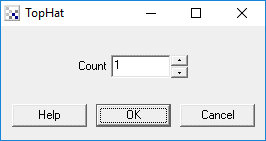
Instructions
1. Specify the number of times to perform erosian before dilation. Higher numbers will open thicker connected objects which will result in larger connections being displayed in the final image.
Example
Source Image

Top Hat with count of 1

Top Hat results shown in white. Original image in red.
See Also
| New Post |
| TopHat Related Forum Posts | Last post | Posts | Views |
| None |