

Modbus Slave
The Modbus Slave module provides an interface between RoboRealm and a modbus master such as a PLC device. The modbus slave module requires an Ethernet based master and can handle multiple variable mappings between RoboRealm and the master.
Interface
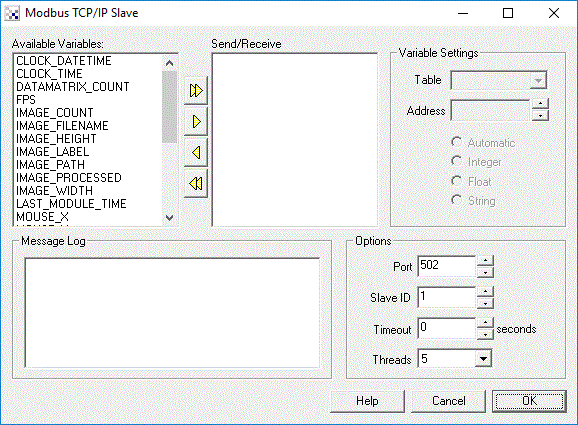
Instructions
1. Available variables - Displays a list of available variables within RoboRealm that can be mapped to modbus memory locations.
2. Send variables - The list of variables that are configured with modbus settings such that a modbus master can access those variables.
3. Variable Settings - Used to configure how the RoboRealm variables are exposed as modbus registers or coils.
4. Table - The modbus table that the variable should be accessible via.
5. Address - The modbus address that is used to access the variable. This address is relative to the table used.
6. Automatic, Integer, Float, String - defines the type of the variable to transmit. Changing the type will alter the format of the transmitted data. The master modbus must understand the format in order to utilize the variable correctly.
7. Options - Specifies the network settings for modbus.
8. Port - The port that the modbus slave module is listening on in order to accept and process requests.
9. Slave ID - The modbus slave id that this slave module will accept.
10. Timeout - The timeout in seconds of any network interaction between the module and the modbus master.
11. Threads - The number of active threads that will respond to modbus requests. If you only expect to have one modbus master communicate with RoboRealm just use a single thread.
See Also
Open Sound Control
For more information
Modbus.org
Wikipedia - Modbus
| New Post |
| Modbus_Slave Related Forum Posts | Last post | Posts | Views |
|
Modbus Master implementation
Hello . I have a robot which has a Modbus slave and I need to integrate it to work with RoboRealm. | 7 year | 2 | 1825 |
|
How to read an integer array using Modbus?
How to read an integer array element and send it to the Modbus server? It works fine on an simple integer variable... |
9 year | 2 | 3240 |
|
connect to modbus
does roborealm support Devicenet or only modbus? ... |
10 year | 2 | 3187 |
 modbus TCP/IP slave problem
Hi I have a problem with modbus TCP/IP slave. I am trying to connect R/R to PLC. but ... |
12 year | 3 | 4031 |
|
Modbus master communication
Hi, Are there any plans of integrating a modbus TCP master module in to RR? I have a PLC that only... |
13 year | 2 | 3620 |
|
communication b/w RR and PLC
Hi I am struggling to communicate with PLC. Modbus slave is good module but I don't know how to us... |
13 year | 3 | 3902 |

 Modbus slave problem
Hi Steven, I have been testing the Modbus slave functionality and there seems to be a bug in the works. When I use... |
15 year | 3 | 4842 |