

Ftp Images
The Ftp Images module provides a way to transmit images from RoboRealm to an FTP server. This module can be used to update remote sites with images based on a specific frequency or time criteria. You can also overwrite the same image in the remote FTP site each time or cause the filename to change on each upload.Note that your network must allow for outbound FTP network connections in order for this module to function. Also note that the FTP uses passive mode for uploading images.
Interface
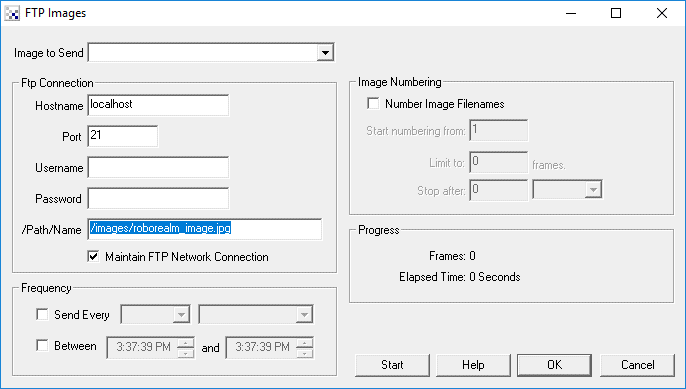
Instructions
1. Image to Save - Specify which image you would like to send to the remote FTP site
2. Hostname - The name of the FTP server to send the image to
3. Port - The command port of the FTP server (default is 25)
4. Username - The username of the login required to access the remote FTP server
5. Password - The password for the login required to access the FTP server
6. Filename - The path/filename to save the image as in the FTP server
7. Send Every - As you will probably not want to send each image to the FTP server you can specify a periodic frequency in which to send the image. For example, sending an image every minute or every 20 seconds would help to reduce bandwidth issues and still provide an image that updates.
8. Between - You can also specify that images will only be uploaded during a specified time range. This can be useful if you wish to only upload images during a certain time period (for example, only upload images after office hours).
9. Number Image Filenames - If you wish to keep all the images uploaded to the FTP server you can chose to use a different name for each upload. Selecting the numbering option will cause a number to be attached to the filename that is incremented for each new uploaded image.
Because you could fill up hard drive space quite quickly in doing this you also have the option to limit the number of uploaded images to X number of images or after a set amount of time (whichever comes first).
10. START - To start sending frames press ‘Start’. You can also manually stop the recording by pressing ‘Stop’. Once START is pressed you can save the robofile or exit RoboRealm as on reentry or reloading of the robofile the START button will already be depressed and immediately start sending images (as appropriate).
See Also
Write Images
| New Post |
| Ftp_Images Related Forum Posts | Last post | Posts | Views |
|
FTP upload Frequency issue
I'm setting the Frequency section of FTP Images. The Send Every and Between seem to have issues. Wh... |
17 year | 13 | 5491 |
 Multiple Camers
I've been wrestling with this for 2 days now... how can I get RR to load using a specific camera and .robo file? | 17 year | 9 | 5296 |
|
Date/Time Stamp
Is there a way to get the 'real time' date/time stamp (display) on images uploaded? Maybe I've missed something bu... |
17 year | 7 | 5744 |