

Endurance Servo Controller
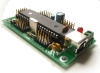 The Endurance Servo module allows you to interface RoboRealm to servos using a controller made by Endurance R/C
The USB based servo controller supports up to 25 servos and provides for an external servo power supply in
order to run 5v, 6v, or 9v servos.
The Endurance Servo module allows you to interface RoboRealm to servos using a controller made by Endurance R/C
The USB based servo controller supports up to 25 servos and provides for an external servo power supply in
order to run 5v, 6v, or 9v servos.
Interface
Instructions
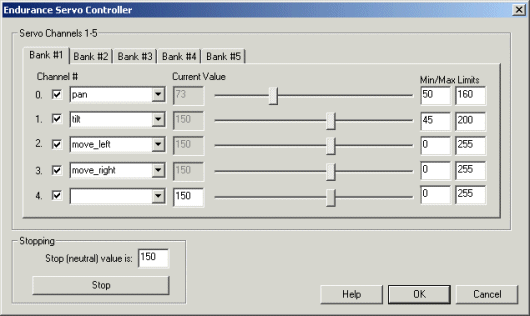
1. Checkbox - To enable/disable a particular servo channel select the checkbox to change its state. When disabled the servo position will not change.
2. Scroll Bars - Move your servos by dragging the sliders to the right or left or by specifying a number within the current value text box in the Current Value textfield. If the servos do not move check your USB and/or board external power connections. You should see the red led light up on the controller if the USB connection is functioning correctly and providing power to the board. Note that in order for the servos to move you need to have the external power supply connected.
3. Variable Dropdown - Select an appropriate variable that contains or will contain the position value that will be sent to the servo board. This is used to automatically change the servo values based on your VBScript (using the SetVariable function) or Extension based program.
4. Min/Max Limits - You can use the min/max limits to ensure that even if the variables specify large or low values (due to programming errors) that the board does not actually attempt to move the servos above or below the specified limits. This can be used as an additional precaution in case your servos cannot physically move beyond certain limits.
5. Press STOP if you need to quickly disable all the servos and return them to the middle or neutral (150) position.
Note that if you set a servo channel to be positioned using a variable's value you will lose manual control over that servo. Changing the variable value, however, will change that servo's position.
See Also
Endurance PCTx
Endurance WiFi Servo
For more information
Endurance R/C - 25 Servo Controller
| New Post |
| Endurance_Servo Related Forum Posts | Last post | Posts | Views |
| None |