

Display Circle
The Display Circle module provides a way to draw a Circle based on a single point plus radius. The Circle points can be specified as static numbers or accessed from variables in two different formats. Note that the Circle is drawn into the current image and will affect subsequent processing.
Interface
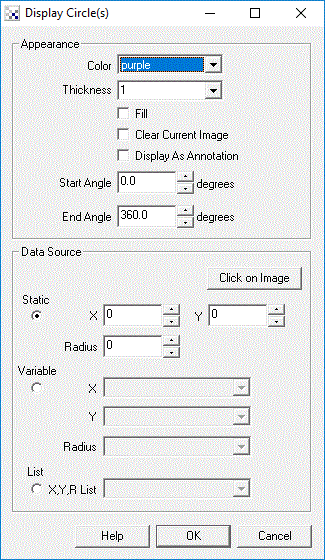
Instructions
1. Color - Select the appropriate circle color.
2. Fill - Select if the circle should be filled or empty.
3. Display as Annotation - Select if you want the graphic to be draw after all processing has been completed. If this is NOT selected then the next module in the processing pipeline will see the graphic as if it were part of the image and process it accordingly.
4. Angle - To draw a partial circle or arc you can specify the start and end angles of the circle to be drawn. These values are in degrees. Note that you can use variable expressions to automatically change this value. Angle are only respected on circle drawing and not when filling the circle.
5. Data Source - Select where the circle coordinates and radius should be taken from
6. Clear current image - Select to clear the current image and draw the graphics on a black image.
Example
| Display Circle |
 |
See Also
Display Rectangle
| New Post |
| Display_Circle Related Forum Posts | Last post | Posts | Views |
 Display Arc
Hi, I'm new here. Is there anyway to draw arc in Roborealm? What i know is that it can draw circle... |
15 year | 6 | 4351 |