

Collapse
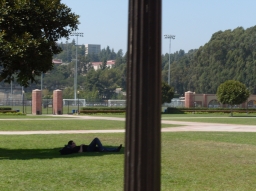
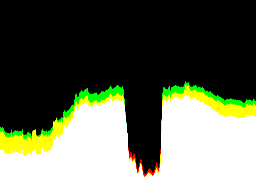
The Collapse module is a morphological module that can be used to analyze an object's shape. The module will collapse a binary image by shifting the non-black pixels to the side of the image specified in the user interface. The resulting image appears like a histogram but instead of representing the number of colors within an image (a histogram) it show how many non-black pixels are in each vertical or horizontal scan line (when in Binary mode). Basically each scan line (either horizontal or vertical) is scanned for non-black pixels. If one is found, the resulting height if incremented by 1. This continues for all scan lines. Note that left & right and top & bottom are symmetrical views of the same information.This module is useful in shape analysis where decomposing the shape of an image reduces the shape detection problem to a 1 dimensional problem rather than a 2 dimensional problem. While the reduction in dimension does come at a shape uniqueness price it can be a sufficient model in many cases.
This module is often combined with the peak detection module to determine if a shape is present.
Interface
Instructions
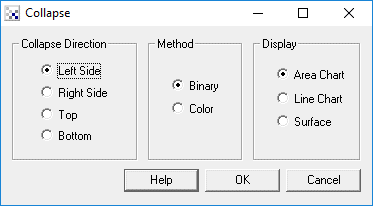
1. Direction - Specify which direction you want the current pixels to collapse/shift towards
2. Method - If you have black and white pixels you can use Binary mode to create the histogram. If instead you have grayscale or colored pixels that represent the intensity value of the pixel then selecting analog mode will sum up all those pixels and create a white pixel to represent values greater than 255.
3. Display - Choose how you'd like to display the results. Area Chart will display a solid chart in the appropriate direction. Line Chart is similar to an Area Chart but only includes the chart border. Surface will display the accumulated values as a pixel intensity line that fills the entire image. This can be thought of as looking at the results from above versus from the side like the Area and Line Charts do.
Example
| Source | Left Collapsed |
 |  |
| Bottom Collapsed | Right Collapsed |
 |  |
| Source | Bottom Analog Collapsed |
 |  |
Variables
	COLLAPSE_MAX - maximum collapsed value in binary mode
	COLLAPSE_MAX_POSITION - position (X or Y) of maximum value in binary mode
	COLLAPSE_MIN - minimum collapsed value in binary mode
	COLLAPSE_MIN_POSITION - position (X or Y) of minimum value  in binary mode
	COLLAPSE_AVERAGE - average collpased value in binary mode
	COLLAPSE_VALUES - count values for each row/column

	COLLAPSE_MAX_RED - maximum collapsed red value in color mode
	COLLAPSE_MAX_POSITION_RED - position (X or Y) of maximum red value in color mode
	COLLAPSE_MIN_RED - minimum collapsed red value in color mode
	COLLAPSE_MIN_POSITION_RED - position (X or Y) of minimum red value in color mode
	COLLAPSE_AVERAGE_RED - average collpased red value in color mode
	COLLAPSE_VALUE - count values for each row/column
	COLLAPSE_RED_VALUES - count values for each red row/column

	COLLAPSE_MAX_GREEN - maximum collapsed green value in color mode
	COLLAPSE_MAX_POSITION_GREEN - position (X or Y) of maximum green value in color mode
	COLLAPSE_MIN_GREEN - minimum collapsed green value in color mode
	COLLAPSE_MIN_POSITION_GREEN - position (X or Y) of minimum green value in color mode
	COLLAPSE_AVERAGE_GREEN - average collpased green value in color mode
	COLLAPSE_GREEN_VALUES - count values for each green row/column

	COLLAPSE_MAX_BLUE - maximum collapsed blue value in color mode
	COLLAPSE_MAX_POSITION_BLUE - position (X or Y) of maximum blue value in color mode
	COLLAPSE_MIN_BLUE - minimum collapsed blue value in color mode
	COLLAPSE_MIN_POSITION_BLUE - position (X or Y) of minimum blue value in color mode
	COLLAPSE_AVERAGE_BLUE - average collpased blue value in color mode
	COLLAPSE_BLUE_VALUES - count values for each blue row/column
See Also
Side Fill
Line Alignment
Threshold
| New Post |
| Collapse Related Forum Posts | Last post | Posts | Views |

 detection ofmarking/blck spot on flat moving object
anybody help whether is it possible to detect spot or black spot on a moving object by using this software and cc... |
11 year | 6 | 3769 |
 Detection and measurement of parked cars
Hello everybody, I tried roborealm months ago, but I didn't really take the necessary time to fini... |
12 year | 3 | 4134 |