

Color Banding
The Color Banding module is similar to the Pseudo Color module in that it creates an artificial color palette on which to apply the current image. In the case of the Color Banding module the colors are unique colors (colors that differ enough from each other to be visually different) and are looped around the full palette until the entire range is used. This palette configuration will intensify small intensity changes in a surface and reveal subtle textures that may not be visible within the current full color image. See the water surface below.
Interface
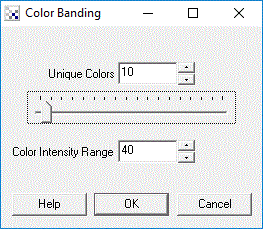
Instructions
1. Select the number of unique colors used in the color banding process
2. Specify the intensity range used by each unique color. For example, if the intensity
range is 5 and a the next unique color is red then the next 5 used colors will be
from (152,0,0) (177,0,0) (202,0,0) (227,0,0) (252,0,0). This proceeds until the entire color
spectrum has been filled. Once the unique number of colors are used the process restarts
from the first unique color.
Example
| Source | Color Banded |
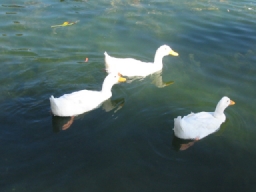 | 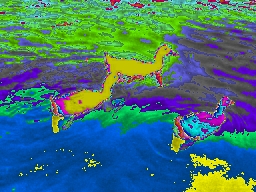 |
See Also
Pseudo_Color
| New Post |
| Color_Banding Related Forum Posts | Last post | Posts | Views |
| None |