

Timer
The Timer module allows you to continue processing images based on certain time constraints. Namely, you can proceed every 10 seconds, or 5 minutes or only between 9:00am to 5:00pm, etc. These time constraints allow you to specify a slower than realtime capability for those actions that don't need it. For example, you can specify that an image be saved to disk (in various formats) once every 30 seconds.
Interface
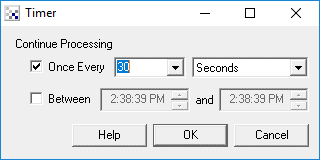
Instructions
1. Select the appropriate timing condition using the checkboxes.
Once Every - specifies that processing should continue based on a periodic time frequency
Between - specifies that processing should continue only during the specified time range. Remember 12:00pm is noon and 12:00am is midnight.
2. Select the appropriate dropdown boxes to yield the desired timing frequency. Note that once every 60 seconds is the same as once very 1 minutes.
3. Select the time range that processing should continue.
If neither checkbox is selected processing continues as normal. When processing of images is stopped due to one of the time constraints the image displayed will reflect processing up to that point. You will still see the image change and update based on the camera update rate but no processing will be performed after the Timer module insertion point.
| New Post |
| Timer Related Forum Posts | Last post | Posts | Views |
 Sleep/Pause/Wait
Is there a way to freeze an image for a few seconds? In case that I have found a result, I'd like t... |
12 year | 5 | 4067 |
|
Set Frame Rate
Is there a way to set the frame rate to be a constant value. Either application wide or as a feature of the Distribut... |
12 year | 4 | 3432 |
|
Timer Random
Hi, I would want to know if among the various modules of the pipeline there is a way for inserting a timer "rando... |
13 year | 8 | 4620 |
|
time module
hi! RR havnt a a time module! it show time of ruuning commands,but it can not show time o... |
17 year | 4 | 4833 |