

Read Variables
The Read Variables module allows you to read in RoboRealm variables from the disk drive in various formats. This can be used to load configuration or discrete data into RoboRealm for use with its modules. Be aware that this module only reads in the file once it has changed on disk. If you change a variable that has been read in from disk it will be overwritten once the file changes and is re-read into RoboRealm.For more direct methods of changing variables within RoboRealm see the API.
Interface
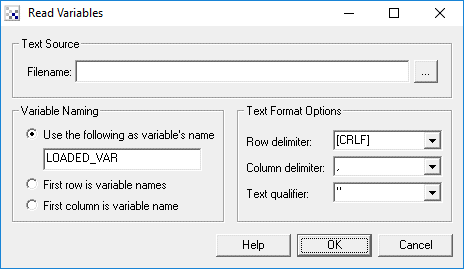
Instructions
1. Filename - Specify the file that contains the information to be read into RoboRealm. Note that RoboRealm does NOT enforce a filename extension as it is expected to be a text file of some sort.
2. Variable Naming - Select how the name of the variables should be determined from the text file
3. Row delimiter - Specifies the delimiter (separator) that indicates the start of a new row (record). This will typically be CRLF (linefeed, carriage return) for most text files but may differ occasionally.
4. Column delimiter - Specifies the delimiter (separator) that indicates the start of a new column. This is typically a comma for CSV type files but might instead be a space for INI type files. (The variable name is followed by a space which is followed by the value which may include spaces too.)
5. Text qualifier - Specifies the symbol that groups text together disregarding the earlier delimiters. For example, a value in a CSV file may have a comma in it which would normally mean that a new column has been indicated unless the value is surrounded by quotes. The quote is the text qualifier which ensures that the value is specified outside of the row and column delimiter criteria.
Example
For the following data file:
X,Y,Z
100,100,100
200,200,200
300,300,300
Specify that the first row contains the variable names, the row delimiter is CRLF, the column delimiter is a comma and the text qualifier is not used. This would create three variables with a list of 3 items each.
Next:
X 100
Y 200
Z 300
Specify that the first column contains the variable names, the row delimiter is CRLF, the column delimiter is a space and the text qualifier is not used. This would create three variables each with a single value.
Next:
option1 some option text
option2 some more text
Specify that the first column contains the variable names, the row delimiter is CRLF, the column delimiter is a space and the text qualifier is not used. This would create two variables each with a single line of text. In this case even though the column delimiter is set to a space the values of the variables are NOT split. In other words only the first column delimiter is respected when using this style of data file.
Next:
100,200,300Specify a variable name such as LOADED_VAR, the row delimiter is empty, the column delimiter is a comma and the text qualifier is not used. This would create a single variable (LOADED_VAR) with three values.
Next:
this is some text.Specify a variable name such as LOADED_VAR, the row delimiter is empty, the column delimiter is also empty and the text qualifier is not used. This would create a single variable (LOADED_VAR) with a single text string.
See Also
Write_Variables
| New Post |
| Read_Variables Related Forum Posts | Last post | Posts | Views |
|
reading variables from named file
I would like to read variables from named files. Am I doing something wrong, or is the [filename] option not supp... |
12 year | 0 | 2772 |
|
Intermittent Read Variable Module
For some reason the "Read Variable" module is acting flaky as if it gets skipped over intermittently. Is there a ma... |
14 year | 3 | 3797 |