

Read Clipboard
The Read Clipboard module provides a way to read images into RoboRealm from the system keyboard. When the clipboard is updated RoboRealm receives that image and will continue to process the image.
Interface
Instructions
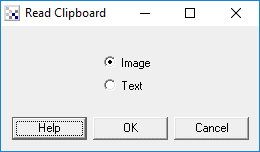
1. Select which type of data you would like to read from the clipboard. 'Image' refers to reading bitmap images from the clipboard whereas 'Text' refers to ascii text. An image read from the clipboard will replace the current image in the main RoboRealm GUI view. Any text that is read from the clipboard is placed in a CLIPBOARD_TEXT variable.
Example
 Click Here to run a robofile that will process an image in the
clipboard and update its content with the processed results. Thus while running you can open a paint
program, copy some image content into the clipboard and then paste the processed results back into the
paint program without even accessing RoboRealm between the copy and paste.
Click Here to run a robofile that will process an image in the
clipboard and update its content with the processed results. Thus while running you can open a paint
program, copy some image content into the clipboard and then paste the processed results back into the
paint program without even accessing RoboRealm between the copy and paste.
Variables
CLIPBOARD_TEXT - the text read in from the clipboard. Maximum length
                 that can be read is 32768.
See Also
Write Clipboard
| New Post |
| Read_Clipboard Related Forum Posts | Last post | Posts | Views |
| None |