

Line Corners
The Line Corner module is a curvature corner detector. The module works by identifying straight lines within the image and then plots points at the intersections of these lines. The benefit to using intersecting lines to generate interest points is that they are typically quite stable and can exist in areas of implied corners (i.e. where soft corners exist).The Line Corner module expects an edge extracted image to work correctly. Thus you must use Canny or other edge finding modules before running the Line Corner module.
Interface
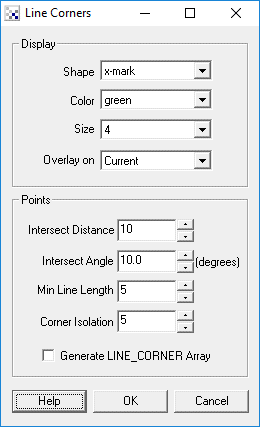
Instructions
1. Be sure to have an edge detected image (using something like Canny) before using the Line Corner detection module.
2. Intersect Distance - how far from the end of the line should an intersection be considered. The larger this number the further away the detected intersections will appear from the originating lines. The smaller the number the closer the line intersections will need to be in order to trigger a point display.
3. Intersect Angle - the minimum angle the two lines need to make at the intersection for the point to be considered. See the last example image below that filters all but about 90 degree line intersections.
4. Min Line Length - the minimum line length that should be considered for intersection. As shorter lines have less defined slope they should normally be eliminated otherwise they may cause spurious line intersections.
5. Corner Isolation - many points may be detected close to each other (especially in a noisy image). Increasing this number will endure that detected corners are far enough away from other corners to avoid creating a pack of corners.
6. Generate LINE_CORNER Array - creates a RoboRealm variable that contains the x,y coordinates of each detected corner point. Note that the array is even size with LINE_CORNER(0) being the X coordinate and LINE_CORNER(1) being the Y coordinate. LINE_CORNER(2) would then be the X coordinate of the next point.
7. Display Shape, Color, Size - the shape, color, and size of the graphic corner indicators
8. Overlay On - as you will be working on a edge detected image you can select the final image on which to overlay the graphics in order to better understand where the corners are being detected.
Example
| Source | Canny Edge |
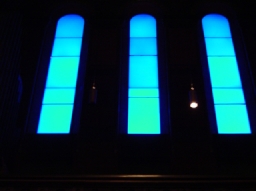 | 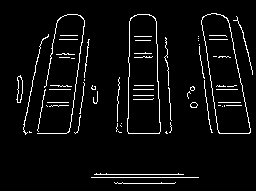 |
| Line Corners | Intersect Angle at 87.5 |
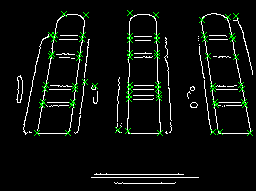 | 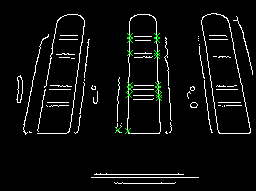 |
Notice the middle lines of the windows in the Canny image. Those lines are not connected to the edges of the windows (due to bad edge detection) but the Line Corner module recognizes these as corners due to the line intersection between those horizontal middle lines and the outer vertical lines. (Assuming the Intersect Distance allows an intersection at a length > 10).
Variables
LINE_CORNER - contains x,y coordinates of detected corners
See Also
Straight Lines
| New Post |
| Line_Corner Related Forum Posts | Last post | Posts | Views |
| None |