

Intensity
The Intensity module provides a way to brighten an image by adding a specified amount to each RGB pixel value. Note that you can specify a negative number to reduce the brightness of each pixel too. A pixels value ranges from 0 to 255. Adding 255 to each pixel turns the image white. Adding -255 will turn each pixel black.R=R+value
G=G+value
B=B+value
Interface
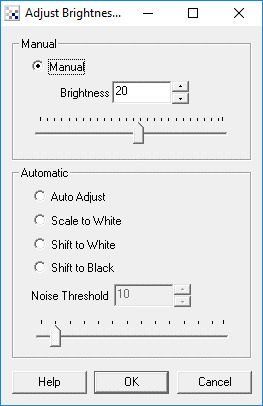
Instructions
1. Manual - Use the count value to select how much to add to the current image. You can either type in a number or use the scroll bar. To automate the adjustment of intensity you can use the [variable] expression in the text box in order to have the module read the value from a variable instead of using a set value.
2. Automatic - Select the appropriate method to use in determining the appropriate
threshold.
- Auto Adjust - automatically adjusts the intensity level such that the mean intensity is at 128 (middle of 0 to 255).
- Scale to White - adjust all pixel values such that at least one pixel at value 255 exists. All pixels are affected by the same scale factor.
- Shift to White - adjust all pixel values such that at least one pixel at value 255 exists. This ensures that the image has more upper values of the 0 - 255 range.
- Shift to Black - adjust all pixel values such that at least one pixel at value 0 exists. This ensures that the image has more lower values of the 0 - 255 range.
3. Noise Threshold - the automatic intensity adjustment routines are very sensitive to pixels that are high in intensity. If even a spurious single pixel is pure white it will prevent most of the automatic routines from working well. Setting the noise threshold to higher than 0 will soften that requirement and instead require that a group of pixels are at a certain high intensity before adjusting the rest. This helps to ensure that the auto-adjustment occurs regardless of white noise pixels being present in the image.
Example
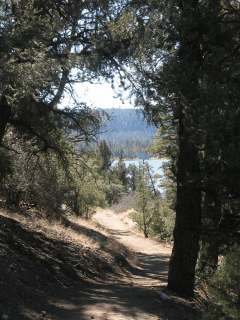
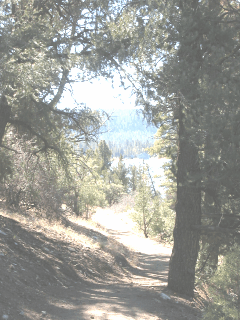
| Source Image | Intensity value of 87 |
 |  |
See Also
| New Post |
| Intensity Related Forum Posts | Last post | Posts | Views |
| None |