

Image Distributor (Client & Server)
The distributor module provides a gateway into parallel distributed image processing where it is possible to use more than one computer to process images at a time. Using more than one computer enables more sophisticated processing that would otherwise over-tax a single computer. For example one can perform some basic processing on a mobile robot and then wirelessly transmit the image off robot to another networked system to perform more extensive analysis. We use this technique to simply display what the robot is seeing on another machine (our robots typically do not have monitors attached) and to also save that stream to a file for later playback in our tutorials.The distributor system is broken into a client and server component. The server component distributes the 'source' image. Clients will connect to the server to grab images and variables as needed. Clients can also return the images (similar to our plugins) and/or variables to the source server computer. For example, a robot would be the server whereas a desktop connected to that robot would be the client.
Adding the client distributor to the processing pipeline will insert two tags into the pipeline. Anything placed between these tags will be executed with the results being passed back to the server if the appropriate checkboxes are selected in the distributor client interface. In this way each client can perform a transformation that is then transferred back to the server as either an image or just resulting variables.
Interface
Client
Server
Server Instructions
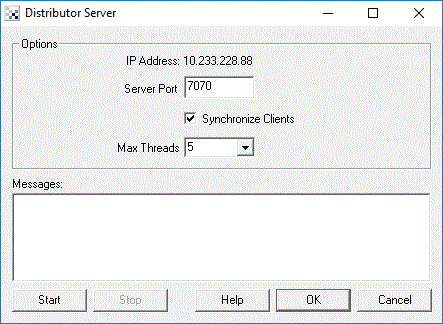
1. Specify the port number on which to server images. Default is 7070
2. Specify if you want all the client requests to be synchronized. If the client requests are synchronized
then all clients need to respond before the server will display the next image. This is useful when
you require each client to process the current image before the server can continue. If you do not
have this requirement leave the checkbox unchecked as this can slow the processing unnecessarily to the slowest connected client.
3. Specify the maximum number of threads that are created to serve images. If you have a large number
of clients connecting to the server increase the value from the default 5. Note that you will need to
stop and start the server to accept this change.
4. Press 'Start' to start serving images and variable data.
Client Instructions
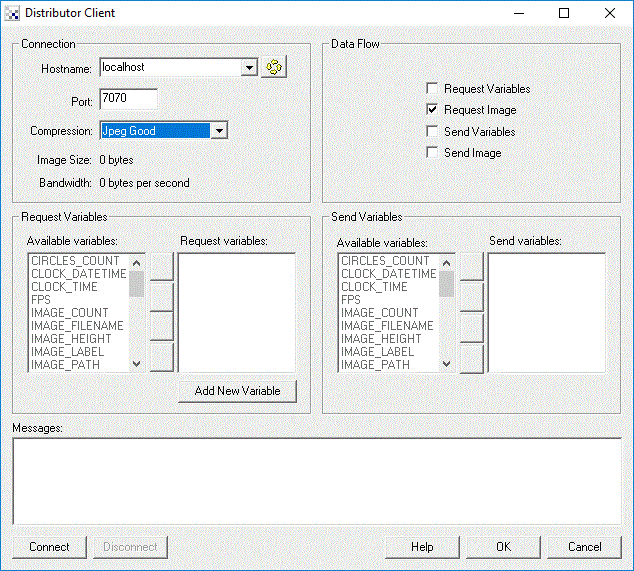
1. Specify the server hostname that you will grab the image from.
2. Specify the port number on the hostname which will serve images. Default is 7070
3. Specify the compression performed when sending images to and from the client.
See below for explanation of the compression technique.
4. Specify what types of data you are requesting and sending. Selecting the least amount of
information flow will help to reduce network traffic. For example, if you are just viewing the
video stream just select the 'Request Image' checkbox. You can also specify which variables
specifically you want to send or request. This will help to reduce network traffic and
prevent variables from the two communicating programs from overwriting each other
as the variables are updated.
5. Press 'Connect' to connect to the server and start viewing the video.
Compression Techniques
In order to reduce network latencies several compression techniques are made available to compress image data prior to transmission to and from the client. Each technique has its advantages based on what your intended use of the image data is. The techniques are explained below relative to a 320x240 image.
- None - No compression. Image size is 320*240*3 bytes
- Packed 555 RGB - RGB 24 bit (3 bytes) image is packed into 15 (2 bytes) data. Image size is 320*240*2 bytes
- Packed 332 RGB - RGB 24 bit (3 bytes) image is packed into 8 bits data. Image size is 320*240 bytes
- Packed 323 RGB - same as 332 except that the green channel is given only 2 bits
- Packed 233 RGB - same as 233 except that the blue channel is given only 2 bits
- Greyscale - color image is reduced to greyscale image. Image size is 320*240
- LZW - image is compressed using LZW (GIF) compression with delta (previous frame is subtracted from current) compression. Image size varies but will be around 150000 bytes.
- Low Lossy 1 - image is compressed with Harr Wavelet (color reduced), Delta, and finally LZW compression. Lossy factor is low. Image size varies but will be around 60000 bytes.
- Lossy 2
- Med Lossy 3 - image is compressed with Harr Wavelet (color reduced), Delta, and finally LZW compression. Lossy factor is medium. Image size varies but will be around 15000 bytes.
- Lossy 4
- High Lossy 5 - image is compressed with Harr Wavelet (color reduced), Delta, and finally LZW compression. Lossy factor is high. Image size varies but will be around 3000 bytes.
- Jpeg Superb - image is compressed using highest quality Jpeg compression.
- Jpeg Good
- Jpeg Normal
- Jpeg Average
- Jpeg Bad - image is compressed using lowest quality Jpeg compression.
Variables
DISTRIBUTOR_CLIENT_CONNECTED - when using the client module equals 1 when the
  client is connected to a server, removed when not.
DISTRIBUTOR_SERVER_CONNECTIONS - when using the server module, this equals the
  number of currently connected distributor clients.
See Also
Plugins
| New Post |
| Distributor Related Forum Posts | Last post | Posts | Views |
| None |