

Bayer Filter
The Bayer Filter module will rearrange the current image pixels from a Bayer format to an RGB color format. The Bayer pixel format is used by most CCD cameras to sample red, green and blue colors using different color sensors. These color sensors then produce an image that has the red, green and blue colors interlaced around each other. In order to create a reasonable color representation these single channel color pixels need to be combined in such a way as to produce a color image.For a more in depth review of the Bayer format in addition to an interactive demo see The Imaging Source.
Interface
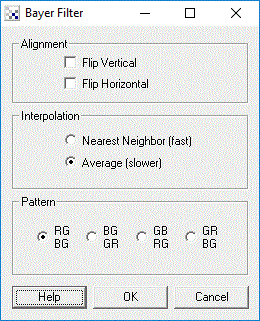
Instructions
1. Interploation - Select which type of interpolation mode you would like to use in creating a color image.
2. Flip - Mirrors the image horizontall or vertically to get the right orientation.
3. Pattern - Specify what Bayer pattern is used in the image. The first two letters represent the labels for the first two pixels on the first row. The second two letters represent the first two pixels on the second row. Note that R=red, G=green, B=blue.
Example
| Bayer Source Image | Colorized |
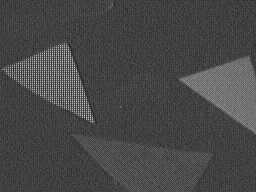 | 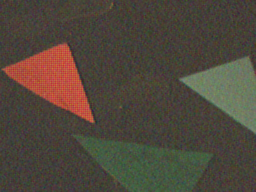 |
For more information
The Imaging Source
Wikipedia - Bayer Filter
| New Post |
| Bayer Related Forum Posts | Last post | Posts | Views |
| None |